.svg)

The Definitive Guide to Web Scheduler for Law Firms
.webp)
Why Managing Client Consultations Online Is a Game-Changer for Law Firms
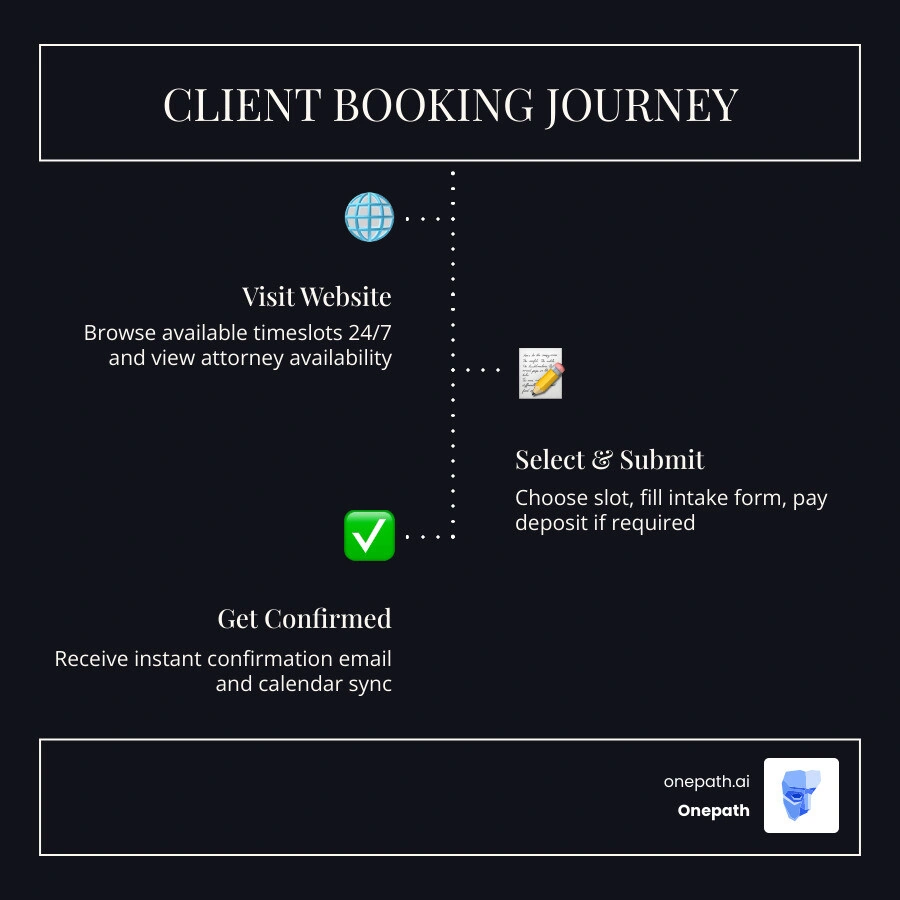
A web scheduler for law firms is an online booking system that lets clients self-schedule consultations, calls, and meetings directly through your firm's website — without phone tag, back-and-forth emails, or front-desk bottlenecks.
Here's what it does at a glance:
• Lets clients book 24/7 — even outside office hours
• Sends automatic confirmations and reminders — reducing no-shows
• Syncs with attorney calendars — preventing double-bookings
• Collects intake information upfront — so consultations start prepared
• Accepts consultation fees or deposits at booking — securing the appointment
Law firms run on time. Every hour spent coordinating schedules manually is an hour not spent on casework, client service, or billable work. Research shows that online appointment booking can save law firms up to 15 hours per week in administrative tasks alone — and firms that make the switch see a 40% reduction in no-show rates.
Yet many practices are still relying on phone calls and email chains to book something as straightforward as an initial consultation. That creates friction for clients, stress for staff, and lost revenue for the firm.
The good news? A well-configured web scheduler solves all of this — and it does it while keeping sensitive client data secure and your ethical obligations intact.
Explore more about web scheduler for law firms:
• Web Scheduler for Small Business
• Web Scheduler for Medical Practices
Why Your Practice Needs a Web Scheduler for Law Firms
In the legal landscape of 2026, efficiency is no longer just a goal; it is a necessity for survival. When prospective clients need legal help, they often face highly stressful situations. They want answers, and they want them immediately. If they have to wait for your office to open on Monday morning just to book a 15-minute consultation, they will likely move on to a competitor who makes booking instant.
Implementing a secure Web Scheduler bridges the gap between your firm’s availability and client expectations. Statistics show that 65% of clients prefer booking appointments online rather than calling an office. By failing to offer this option, you may be turning away more than half of your prospective leads before they even speak to an attorney. Furthermore, firms utilizing web-based schedulers report an average 25% increase in client retention.
To understand the difference this technology makes, let's compare traditional manual scheduling with automated web scheduling:
• Availability — Manual Scheduling: Only during business hours (9 AM - 5 PM) — Automated Web Scheduling: 24/7/365 self-service booking
• Time to Book — Manual Scheduling: 5 to 15 minutes of back-and-forth communication — Automated Web Scheduling: Under 2 minutes
• No-Show Rates — Manual Scheduling: High (often due to lack of timely reminders) — Automated Web Scheduling: Low (reduced by up to 40% via automated SMS/emails)
• Data Collection — Manual Scheduling: Taken manually over the phone, prone to errors — Automated Web Scheduling: Secure digital intake forms filled out by client
• Conflict Checks — Manual Scheduling: Completed post-booking, risking ethical issues — Automated Web Scheduling: Integrated upfront before final confirmation
• Admin Overhead — Manual Scheduling: High (up to 15 hours per week lost to scheduling tasks) — Automated Web Scheduling: Near zero (fully automated calendar sync)
Whether you are running a single-attorney office or managing a multi-partner firm, transitioning to a digital workflow is essential. If you are starting out or running a boutique practice, a Web Scheduler for Small Business can help you scale operations smoothly without the need for a massive administrative staff.
Enhancing the Client Experience
The journey of a legal client begins long before they walk into your conference room or log into a virtual meeting. It begins the moment they search for representation. Offering a 24/7 booking option shows prospective clients that your firm is modern, accessible, and respectful of their time.
When a client can schedule an appointment late at night, receive an instant confirmation, and have the event automatically added to their calendar with correct time-zone conversions, their satisfaction skyrockets. This seamless initial interaction builds immediate trust and credibility, setting a professional tone for the entire attorney-client relationship.
Optimizing Time Management and Reducing No-Shows
For attorneys, time is literally money. Non-billable hours spent on administrative tasks represent lost revenue. A web scheduler minimizes these non-billable hours by automating the coordination process.
Additionally, the system acts as an automated assistant by sending customized email and SMS reminders. This simple step drastically reduces missed appointments. By keeping calendars synced in real-time with internal platforms, attorneys can protect their schedules, avoid double-bookings, and focus entirely on billable work. For deeper insights into managing these processes, look into Appointment Booking Assistance for Law Firms.
Essential Features for Legal Scheduling Systems
Not all scheduling tools are built equal, and a generic calendar app will not suffice for the rigorous demands of a law practice. Legal scheduling requires robust tools that prioritize security, customizability, and workflow control.

When selecting a system, look for a platform that allows you to build custom intake forms, integrate directly with your primary calendar system (such as Outlook or Google Workspace), and establish strict buffer rules. Using AI-powered Appointment Booking can take this a step further by intelligently managing time slots and routing leads based on specialized practice areas.
Key Features of a Web Scheduler for Law Firms
To meet the unique demands of legal workflows, your scheduling system must include:
• Conflict-Check Integrations: The system must collect the legal names of all involved parties during booking to allow for mandatory conflict scans before confirming a meeting.
• Neutral Calendar Titles: To protect client confidentiality on public or shared calendars, event titles must remain neutral (e.g., "Client Consultation" instead of "Divorce Consultation with John Doe").
• Secure File Uploads: Clients should be able to securely upload relevant documents (such as contracts or court notices) directly through the booking portal.
• Round-Robin Routing: For multi-attorney firms, the system should automatically route new leads to the next available attorney qualified in that specific practice area.
Secure Payments and Retainer Collection
Many law firms charge a fee for initial consultations to filter out low-intent leads. A legal web scheduler should integrate seamlessly with secure payment gateways to allow you to collect consultation fees or upfront deposits before the booking is finalized.
This ensures that only serious clients occupy your valuable calendar slots. It also streamlines your billing workflow by eliminating the need to chase down payments for brief introductory meetings.
Security, Compliance, and Ethical Considerations
In the legal profession, data security is not just a best practice — it is a strict ethical mandate. Attorneys handle highly sensitive personal, financial, and corporate data, meaning that any tool used to manage client interactions must meet the highest security standards.
When implementing a web scheduler, compliance with data privacy regulations like HIPAA (if handling personal injury or medical cases) and general data privacy acts is paramount. Your scheduling platform must secure all data in transit and at rest with enterprise-grade encryption to protect attorney-client privilege.
Protecting Client Confidentiality on Shared Calendars
A common mistake is allowing sensitive case details to leak through calendar invites. If a shared office calendar displays "Consultation regarding corporate fraud with [Company Name]," you have committed a major confidentiality breach.
To prevent this, use a web scheduler that defaults to neutral event titles on public-facing and shared internal calendars. Detailed notes, case files, and client-specific information should be stored securely within an encrypted internal CRM or legal practice management system, completely separate from the calendar invitation.
Managing Conflict-of-Interest Checks
Before an attorney can discuss the details of a case with a prospective client, they must perform a conflict-of-interest check. Your web scheduler should be configured with a "pending" status workflow.
When a client books a slot, the appointment is held as pending rather than immediately confirmed. The intake form collects the names of opposing parties. A paralegal or intake coordinator then reviews the details, runs the conflict scan, and either approves the booking (triggering the final confirmation email) or declines it if a conflict of interest is identified. This keeps your practice ethically compliant without sacrificing the convenience of online booking.
Integrating Web Schedulers with Existing Legal Workflows
A web scheduler shouldn't operate as an isolated silo. To maximize its value, it must integrate deeply with your existing tech stack, including your client relationship management (CRM) software, case management tools, and communication channels.
When a web scheduler is synchronized with your CRM, it automatically updates client records, logs communication history, and moves prospects smoothly through your client journey. If an automated system needs to hand off a complex query to a staff member, implementing a clear protocol is essential. You can learn more about this in our Human Handoff Complete Guide.
Streamlining Client Intake Processes
The client intake process is often the most labor-intensive part of running a firm. By utilizing customized intake forms within your web scheduler, you can capture crucial case context on minute one.
When a lead books a consultation, their answers are automatically mapped to their contact profile. This eliminates manual data entry, reduces human error, and ensures that the attorney walks into the consultation fully prepared. To take your intake to the next level, check out our AI Lead Management Solutions.
Coordinating Multi-Attorney Calendars
For multi-attorney practices, coordinating schedules can be a daily headache. A robust web scheduler allows you to manage multiple calendars cleanly.
By setting up collective events (where multiple attorneys must be present, such as for a deposition prep) or utilizing round-robin routing (to distribute initial consults evenly among associates), you can keep your team aligned without endless internal emails.
Overcoming Implementation Challenges and Best Practices
Transitioning to a digital scheduling system can sometimes meet with internal resistance or technical hurdles. Attorneys may worry about losing control of their calendars, or staff may find it difficult to adapt to new software.
To successfully implement a web scheduler, you must focus on clear communication and robust training. Demonstrating the time-saving benefits to your staff will encourage adoption. Additionally, integrating tools like voice assistants can streamline communications even further — learn how in our AI Voice Agent for Law Firms Guide.
Best Practices for Implementing a Web Scheduler for Law Firms
To ensure a smooth rollout, follow these industry best practices:
1. Centralize Your System: Route all booking requests — whether from your website, email signatures, or social media profiles — through a single scheduling platform.
2. Define Custom Event Types: Create distinct booking links for different meeting types (e.g., a 15-minute quick check-in vs. a 60-minute case review) to protect your schedule.
3. Establish Strict Buffer Rules: Always configure 15-to-30-minute buffers before and after consultations to allow time for note-taking, document review, and unexpected overruns.
4. Write Clear Booking Disclaimers: Include a checkbox on your booking page clarifying that scheduling a consultation does not establish a formal attorney-client relationship.
Managing Unpredictable Legal Schedules
Legal schedules are notoriously unpredictable. Shifting court dates, urgent filings, and emergency client calls can disrupt even the most organized calendar.
To manage this, utilize advanced features like flexible break windows and personal time blocks. If you have to travel for a hearing, you can instantly block out those hours on your scheduler, automatically updating your public availability. This ensures you never have to scramble to reschedule a client because of a last-minute court appearance.
Frequently Asked Questions about Legal Scheduling
How does a web scheduler handle conflict-of-interest checks?
A professional legal scheduler handles conflict checks by utilizing a "pending confirmation" workflow. During booking, the client must provide the legal names of all parties involved. The system flags the booking as pending, allowing your staff to run a manual or automated conflict scan before the appointment is officially confirmed on the attorney’s calendar.
Can we collect consultation fees securely during booking?
Yes. By integrating your web scheduler with secure, legally compliant payment processors, you can require clients to pay a consultation fee or deposit to secure their slot. This reduces no-shows and ensures your billable time is compensated.
How do we protect client confidentiality on shared calendars?
To protect client privacy, configure your scheduler to use neutral event titles (such as "Legal Consultation") on all shared or public-facing calendars. Keep sensitive case details, notes, and documents restricted to your secure, encrypted CRM or case management system, accessible only to authorized staff.
Conclusion
Embracing digital scheduling is one of the most effective ways to modernize your law firm, reclaim lost billable hours, and deliver an exceptional experience to your clients. By automating the administrative friction of booking, you can dedicate your energy to what truly matters: practicing law and winning cases.
At Onepath, we specialize in helping businesses streamline their workflows and capture every single opportunity. Our AI Lead Manager and all-in-one CRM can be fully set up in just 72 hours, providing complete customer journey visibility, ensuring no lost leads, and offering 24/7 support. Let us handle the logistics so you can focus on your clients.
Ready to transform your practice? Discover how our AI Sales Assistant can revolutionize your firm's client intake and booking process today.

Why Managing Client Consultations Online Is a Game-Changer for Law Firms
A web scheduler for law firms is an online booking system that lets clients self-schedule consultations, calls, and meetings directly through your firm's website — without phone tag, back-and-forth emails, or front-desk bottlenecks.
Here's what it does at a glance:
- Lets clients book 24/7 — even outside office hours
- Sends automatic confirmations and reminders — reducing no-shows
- Syncs with attorney calendars — preventing double-bookings
- Collects intake information upfront — so consultations start prepared
- Accepts consultation fees or deposits at booking — securing the appointment
Law firms run on time. Every hour spent coordinating schedules manually is an hour not spent on casework, client service, or billable work. Research shows that online appointment booking can save law firms up to 15 hours per week in administrative tasks alone — and firms that make the switch see a 40% reduction in no-show rates.
Yet many practices are still relying on phone calls and email chains to book something as straightforward as an initial consultation. That creates friction for clients, stress for staff, and lost revenue for the firm.
The good news? A well-configured web scheduler solves all of this — and it does it while keeping sensitive client data secure and your ethical obligations intact.
Explore more about web scheduler for law firms:
Why Your Practice Needs a Web Scheduler for Law Firms
In the legal landscape of 2026, efficiency is no longer just a goal; it is a necessity for survival. When prospective clients need legal help, they often face highly stressful situations. They want answers, and they want them immediately. If they have to wait for your office to open on Monday morning just to book a 15-minute consultation, they will likely move on to a competitor who makes booking instant.
Implementing a secure Web Scheduler bridges the gap between your firm’s availability and client expectations. Statistics show that 65% of clients prefer booking appointments online rather than calling an office. By failing to offer this option, you may be turning away more than half of your prospective leads before they even speak to an attorney. Furthermore, firms utilizing web-based schedulers report an average 25% increase in client retention.
To understand the difference this technology makes, let's compare traditional manual scheduling with automated web scheduling:
| Feature | Manual Scheduling | Automated Web Scheduling |
|---|---|---|
| Availability | Only during business hours (9 AM - 5 PM) | 24/7/365 self-service booking |
| Time to Book | 5 to 15 minutes of back-and-forth communication | Under 2 minutes |
| No-Show Rates | High (often due to lack of timely reminders) | Low (reduced by up to 40% via automated SMS/emails) |
| Data Collection | Taken manually over the phone, prone to errors | Secure digital intake forms filled out by client |
| Conflict Checks | Completed post-booking, risking ethical issues | Integrated upfront before final confirmation |
| Admin Overhead | High (up to 15 hours per week lost to scheduling tasks) | Near zero (fully automated calendar sync) |
Whether you are running a single-attorney office or managing a multi-partner firm, transitioning to a digital workflow is essential. If you are starting out or running a boutique practice, a Web Scheduler for Small Business can help you scale operations smoothly without the need for a massive administrative staff.
Enhancing the Client Experience
The journey of a legal client begins long before they walk into your conference room or log into a virtual meeting. It begins the moment they search for representation. Offering a 24/7 booking option shows prospective clients that your firm is modern, accessible, and respectful of their time.
When a client can schedule an appointment late at night, receive an instant confirmation, and have the event automatically added to their calendar with correct time-zone conversions, their satisfaction skyrockets. This seamless initial interaction builds immediate trust and credibility, setting a professional tone for the entire attorney-client relationship.
Optimizing Time Management and Reducing No-Shows
For attorneys, time is literally money. Non-billable hours spent on administrative tasks represent lost revenue. A web scheduler minimizes these non-billable hours by automating the coordination process.
Additionally, the system acts as an automated assistant by sending customized email and SMS reminders. This simple step drastically reduces missed appointments. By keeping calendars synced in real-time with internal platforms, attorneys can protect their schedules, avoid double-bookings, and focus entirely on billable work. For deeper insights into managing these processes, look into Appointment Booking Assistance for Law Firms.
Essential Features for Legal Scheduling Systems
Not all scheduling tools are built equal, and a generic calendar app will not suffice for the rigorous demands of a law practice. Legal scheduling requires robust tools that prioritize security, customizability, and workflow control.
When selecting a system, look for a platform that allows you to build custom intake forms, integrate directly with your primary calendar system (such as Outlook or Google Workspace), and establish strict buffer rules. Using AI-powered Appointment Booking can take this a step further by intelligently managing time slots and routing leads based on specialized practice areas.
Key Features of a Web Scheduler for Law Firms
To meet the unique demands of legal workflows, your scheduling system must include:
- Conflict-Check Integrations: The system must collect the legal names of all involved parties during booking to allow for mandatory conflict scans before confirming a meeting.
- Neutral Calendar Titles: To protect client confidentiality on public or shared calendars, event titles must remain neutral (e.g., "Client Consultation" instead of "Divorce Consultation with John Doe").
- Secure File Uploads: Clients should be able to securely upload relevant documents (such as contracts or court notices) directly through the booking portal.
- Round-Robin Routing: For multi-attorney firms, the system should automatically route new leads to the next available attorney qualified in that specific practice area.
Secure Payments and Retainer Collection
Many law firms charge a fee for initial consultations to filter out low-intent leads. A legal web scheduler should integrate seamlessly with secure payment gateways to allow you to collect consultation fees or upfront deposits before the booking is finalized.
This ensures that only serious clients occupy your valuable calendar slots. It also streamlines your billing workflow by eliminating the need to chase down payments for brief introductory meetings.
Security, Compliance, and Ethical Considerations
In the legal profession, data security is not just a best practice — it is a strict ethical mandate. Attorneys handle highly sensitive personal, financial, and corporate data, meaning that any tool used to manage client interactions must meet the highest security standards.
When implementing a web scheduler, compliance with data privacy regulations like HIPAA (if handling personal injury or medical cases) and general data privacy acts is paramount. Your scheduling platform must secure all data in transit and at rest with enterprise-grade encryption to protect attorney-client privilege.
Protecting Client Confidentiality on Shared Calendars
A common mistake is allowing sensitive case details to leak through calendar invites. If a shared office calendar displays "Consultation regarding corporate fraud with [Company Name]," you have committed a major confidentiality breach.
To prevent this, use a web scheduler that defaults to neutral event titles on public-facing and shared internal calendars. Detailed notes, case files, and client-specific information should be stored securely within an encrypted internal CRM or legal practice management system, completely separate from the calendar invitation.
Managing Conflict-of-Interest Checks
Before an attorney can discuss the details of a case with a prospective client, they must perform a conflict-of-interest check. Your web scheduler should be configured with a "pending" status workflow.
When a client books a slot, the appointment is held as pending rather than immediately confirmed. The intake form collects the names of opposing parties. A paralegal or intake coordinator then reviews the details, runs the conflict scan, and either approves the booking (triggering the final confirmation email) or declines it if a conflict of interest is identified. This keeps your practice ethically compliant without sacrificing the convenience of online booking.
Integrating Web Schedulers with Existing Legal Workflows
A web scheduler shouldn't operate as an isolated silo. To maximize its value, it must integrate deeply with your existing tech stack, including your client relationship management (CRM) software, case management tools, and communication channels.
When a web scheduler is synchronized with your CRM, it automatically updates client records, logs communication history, and moves prospects smoothly through your client journey. If an automated system needs to hand off a complex query to a staff member, implementing a clear protocol is essential. You can learn more about this in our Human Handoff Complete Guide.
Streamlining Client Intake Processes
The client intake process is often the most labor-intensive part of running a firm. By utilizing customized intake forms within your web scheduler, you can capture crucial case context on minute one.
When a lead books a consultation, their answers are automatically mapped to their contact profile. This eliminates manual data entry, reduces human error, and ensures that the attorney walks into the consultation fully prepared. To take your intake to the next level, check out our AI Lead Management Solutions.
Coordinating Multi-Attorney Calendars
For multi-attorney practices, coordinating schedules can be a daily headache. A robust web scheduler allows you to manage multiple calendars cleanly.
By setting up collective events (where multiple attorneys must be present, such as for a deposition prep) or utilizing round-robin routing (to distribute initial consults evenly among associates), you can keep your team aligned without endless internal emails.
Overcoming Implementation Challenges and Best Practices
Transitioning to a digital scheduling system can sometimes meet with internal resistance or technical hurdles. Attorneys may worry about losing control of their calendars, or staff may find it difficult to adapt to new software.
To successfully implement a web scheduler, you must focus on clear communication and robust training. Demonstrating the time-saving benefits to your staff will encourage adoption. Additionally, integrating tools like voice assistants can streamline communications even further — learn how in our AI Voice Agent for Law Firms Guide.
Best Practices for Implementing a Web Scheduler for Law Firms
To ensure a smooth rollout, follow these industry best practices:
- Centralize Your System: Route all booking requests — whether from your website, email signatures, or social media profiles — through a single scheduling platform.
- Define Custom Event Types: Create distinct booking links for different meeting types (e.g., a 15-minute quick check-in vs. a 60-minute case review) to protect your schedule.
- Establish Strict Buffer Rules: Always configure 15-to-30-minute buffers before and after consultations to allow time for note-taking, document review, and unexpected overruns.
- Write Clear Booking Disclaimers: Include a checkbox on your booking page clarifying that scheduling a consultation does not establish a formal attorney-client relationship.
Managing Unpredictable Legal Schedules
Legal schedules are notoriously unpredictable. Shifting court dates, urgent filings, and emergency client calls can disrupt even the most organized calendar.
To manage this, utilize advanced features like flexible break windows and personal time blocks. If you have to travel for a hearing, you can instantly block out those hours on your scheduler, automatically updating your public availability. This ensures you never have to scramble to reschedule a client because of a last-minute court appearance.
Frequently Asked Questions about Legal Scheduling
How does a web scheduler handle conflict-of-interest checks?
A professional legal scheduler handles conflict checks by utilizing a "pending confirmation" workflow. During booking, the client must provide the legal names of all parties involved. The system flags the booking as pending, allowing your staff to run a manual or automated conflict scan before the appointment is officially confirmed on the attorney’s calendar.
Can we collect consultation fees securely during booking?
Yes. By integrating your web scheduler with secure, legally compliant payment processors, you can require clients to pay a consultation fee or deposit to secure their slot. This reduces no-shows and ensures your billable time is compensated.
How do we protect client confidentiality on shared calendars?
To protect client privacy, configure your scheduler to use neutral event titles (such as "Legal Consultation") on all shared or public-facing calendars. Keep sensitive case details, notes, and documents restricted to your secure, encrypted CRM or case management system, accessible only to authorized staff.
Conclusion
Embracing digital scheduling is one of the most effective ways to modernize your law firm, reclaim lost billable hours, and deliver an exceptional experience to your clients. By automating the administrative friction of booking, you can dedicate your energy to what truly matters: practicing law and winning cases.
At Onepath, we specialize in helping businesses streamline their workflows and capture every single opportunity. Our AI Lead Manager and all-in-one CRM can be fully set up in just 72 hours, providing complete customer journey visibility, ensuring no lost leads, and offering 24/7 support. Let us handle the logistics so you can focus on your clients.
Ready to transform your practice? Discover how our AI Sales Assistant can revolutionize your firm's client intake and booking process today.
Boost Your Lead Conversions. Start Using Onepath Today.
Onepath is your AI Lead Manager, built by tech experts and home service pros. It responds instantly, schedules appointments, personalizes customer interactions, and ensures no lead slips through the cracks—backed by 24/7 human support.
[ Schedule Discovery call ].webp)