.svg)

.webp)
Why Every Medical Practice Needs a Web Scheduler in 2026
A web scheduler for medical practices is one of the most impactful tools a clinic can adopt today. In short, it lets patients book, reschedule, or cancel appointments online — 24/7 — without calling your front desk.
Here's what a web scheduler for medical practices typically does:
• Lets patients self-book at any time, including after hours
• Sends automated reminders to reduce no-shows
• Syncs with your calendar, EHR, and billing systems
• Handles multi-provider and multi-location scheduling
• Keeps patient data secure and HIPAA compliant
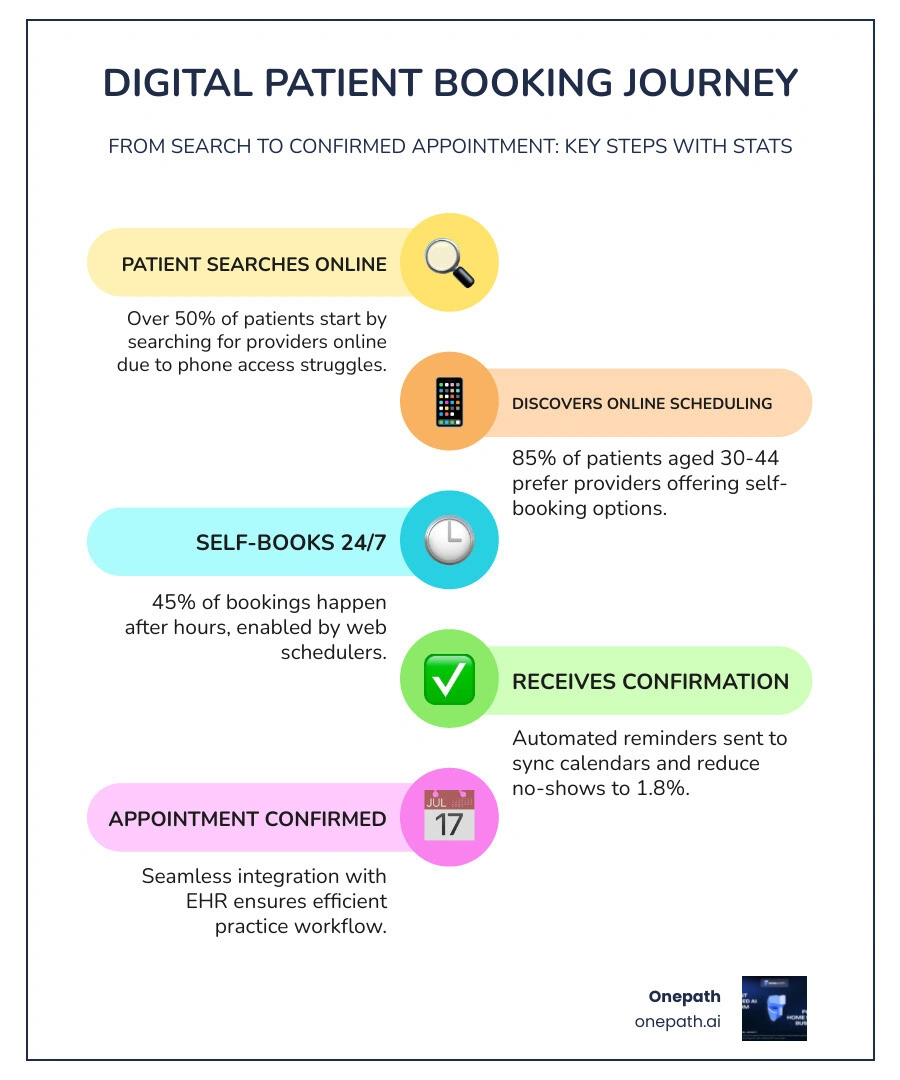
The stakes are real. Over 50% of Americans say they struggle to reach their doctor's office by phone. At the same time, 85% of patients aged 30–44 say online scheduling directly influences which provider they choose. When booking is hard, patients simply move on to someone else.
And it's not just younger patients. Nearly 8 in 10 patients aged 45–60 feel the same way. Practices that rely solely on phone-based booking are quietly losing appointments — and revenue — every single day.
The good news? Modern web scheduling tools are more capable, more affordable, and easier to set up than ever before.
Web scheduler for medical practices terms to know:
• Web Scheduler for Home Services
Why Your Clinic Needs a Web Scheduler for Medical Practices
If we look at the landscape of healthcare in 2026, the digital front door is no longer a luxury; it’s the standard. We’ve seen that 3 in 4 people look online first when seeking a new care provider. If they find your website but can't find a "Book Now" button, there is a high probability they will click away. In fact, 24% of working-age adults say they would reconsider booking an appointment entirely if they couldn't do it digitally.
One of the most eye-opening statistics we’ve encountered in our research is that 45% of medical bookings occur after standard business hours. When your office lights are off and your staff has gone home, your patients are often just starting their "life admin" for the day. A web scheduler for medical practices acts as a tireless front-desk employee that never sleeps, capturing those late-night bookings that would otherwise go to a competitor.
Beyond just capturing new patients, these systems are vital for patient retention. We know that 85% of patients in the 30-44 age bracket and 81% of those aged 45-60 are influenced by the availability of online scheduling. By providing this convenience, we aren't just making life easier for them; we are building loyalty. People stay where things are easy.
For more insights on how to modernize your intake process, check out our Appointment Booking Guide Medical Practices.
Maximizing Efficiency and Patient Satisfaction
Efficiency in a medical practice is often measured by how much time the clinical staff can spend with patients versus how much time is eaten up by paperwork and phone calls. We’ve found that implementing a robust web scheduler for medical practices saves an average of 8 minutes of staff time for every single patient who schedules their own visit. Multiply that by thirty patients a day, and you’ve just reclaimed four hours of your team’s time.
The impact on no-show rates is equally dramatic. Traditionally, unconfirmed appointments result in a 20-30% no-show rate, which costs practices thousands in lost revenue every month. However, data shows that online-booked appointments have a mere 1.8% no-show rate, compared to 5.9% for phone bookings. Why? Because the digital process often includes immediate calendar syncing for the patient and automated, multi-channel reminders (SMS and email) that keep the appointment top-of-mind.
Furthermore, digital scheduling tools allow for "smart scheduling." This means getting patients in for care up to 30 days sooner by automatically filling gaps in the schedule caused by last-minute cancellations. Instead of a staff member spending hours on the phone trying to fill a hole in the afternoon, the system can automatically alert patients on a waitlist.
If your office is currently struggling with high call volumes or missed opportunities, our Abandoned Calls Management Guide Medical Practices offers additional strategies to ensure no patient is left waiting.
Core Functionalities of Modern Scheduling Systems
When we talk about a web scheduler for medical practices, we aren't just talking about a digital calendar. In 2026, these systems are sophisticated hubs that connect every part of the practice.
A truly effective system must have bidirectional integration with your Electronic Health Record (EHR) and Practice Management (PM) systems. This ensures that when a patient books a slot online, it appears instantly in your internal system, preventing double-bookings. It also allows the software to pull patient history, ensuring that a "new patient" isn't actually an "existing patient" trying to book a duplicate profile.
Another critical functionality is real-time insurance verification. Modern tools can check a patient's eligibility the moment they attempt to book. This reduces front-desk friction and prevents the awkward conversation where a patient arrives only to find out their insurance isn't accepted.
Telehealth integration is also a must. The software should be able to distinguish between in-person and virtual visits, automatically generating and sending a secure video link to the patient once the appointment is confirmed.
Essential Features of a Web Scheduler for Medical Practices
To get the most out of your investment, certain features are non-negotiable:
1. HIPAA Compliance: This is the foundation. Any tool handling patient data must use high-level encryption and the vendor must be willing to sign a Business Associate Agreement (BAA).
2. Automated Multi-Channel Reminders: We recommend systems that send reminders via text, email, and even automated voice calls. This ensures the message gets through, regardless of the patient's preferred communication style.
3. Smart Waitlists: As mentioned, these fill cancellations automatically. The best systems use AI to prioritize patients based on clinical urgency or how long they’ve been waiting.
4. Symptom-Based Triage: This allows the system to ask the patient a few brief questions during the booking process. If they report symptoms that require urgent care or a specific specialist, the system can guide them to the correct appointment type or even suggest they call emergency services.
5. Customizable Rules: Your software should respect provider preferences. If Dr. Smith only wants to see new patients on Tuesday mornings, the web scheduler should reflect that logic perfectly.
For a deeper dive into these features, visit our dedicated page on the Web Scheduler.
Choosing the Right Web Scheduler for Medical Practices
Choosing the right platform depends heavily on your practice size and specialty. A solo practitioner might prioritize ease of use and low setup time, while a multi-location enterprise needs a system that can handle complex "round-robin" scheduling to distribute patients fairly among providers.
We also suggest looking for "omni-channel" consistency. This means the rules you set for your website booking should be the same rules used by your call center and your AI voice assistants. This creates a seamless experience for the patient, no matter how they choose to reach out.
For practices looking to take their automation to the next level, our AI Voice Agent Medical Practices Guide explains how voice technology can work alongside your web scheduler to handle inbound calls with natural language understanding.
Frequently Asked Questions about Online Booking
How does online scheduling reduce administrative burden?
Online scheduling shifts the "work" of data entry from your staff to the patient. When a patient fills out their own name, contact info, and insurance details, it flows directly into your EHR. This eliminates manual entry errors and drastically reduces the number of "routine" phone calls your staff has to handle. Instead of spending 10 minutes on the phone explaining available times, your team can focus on the patients physically in the office.
Is patient self-scheduling secure and HIPAA compliant?
Yes, provided you choose a vendor specifically built for healthcare. These platforms use end-to-end encryption for all data transmissions. They also provide audit logs so you can see exactly who accessed patient information and when. Always ensure your provider provides a signed BAA to stay within legal requirements.
Can web-based tools handle multi-provider clinics?
Absolutely. Modern schedulers are designed for complexity. They can manage different schedules across multiple locations, account for different time zones for telehealth, and even manage "resource scheduling"—ensuring that if a patient books a procedure, both the doctor and the specific exam room are available at that time.
Conclusion
The shift toward digital booking is the single most effective way to modernize your practice in 2026. By implementing a web scheduler for medical practices, you aren't just checking a box for technology; you are actively improving patient access, protecting your revenue from no-shows, and giving your staff the breathing room they need to provide excellent care.
At Onepath, we understand that medical practices need solutions that work fast. Our AI Lead Manager and all-in-one CRM are designed for high-growth environments. We offer a 72-hour setup because we know that every day without these tools is a day of lost leads and administrative headaches. With 24/7 human support and full visibility into the customer journey, we ensure that your practice never misses an opportunity to care for a patient.
Ready to see how AI can transform your front office? Streamline your practice with an AI Sales Assistant and start capturing more appointments today.

Why Every Medical Practice Needs a Web Scheduler in 2026
A web scheduler for medical practices is one of the most impactful tools a clinic can adopt today. In short, it lets patients book, reschedule, or cancel appointments online — 24/7 — without calling your front desk.
Here's what a web scheduler for medical practices typically does:
- Lets patients self-book at any time, including after hours
- Sends automated reminders to reduce no-shows
- Syncs with your calendar, EHR, and billing systems
- Handles multi-provider and multi-location scheduling
- Keeps patient data secure and HIPAA compliant
The stakes are real. Over 50% of Americans say they struggle to reach their doctor's office by phone. At the same time, 85% of patients aged 30–44 say online scheduling directly influences which provider they choose. When booking is hard, patients simply move on to someone else.
And it's not just younger patients. Nearly 8 in 10 patients aged 45–60 feel the same way. Practices that rely solely on phone-based booking are quietly losing appointments — and revenue — every single day.
The good news? Modern web scheduling tools are more capable, more affordable, and easier to set up than ever before.
Web scheduler for medical practices terms to know:
Why Your Clinic Needs a Web Scheduler for Medical Practices
If we look at the landscape of healthcare in 2026, the digital front door is no longer a luxury; it’s the standard. We’ve seen that 3 in 4 people look online first when seeking a new care provider. If they find your website but can't find a "Book Now" button, there is a high probability they will click away. In fact, 24% of working-age adults say they would reconsider booking an appointment entirely if they couldn't do it digitally.
One of the most eye-opening statistics we’ve encountered in our research is that 45% of medical bookings occur after standard business hours. When your office lights are off and your staff has gone home, your patients are often just starting their "life admin" for the day. A web scheduler for medical practices acts as a tireless front-desk employee that never sleeps, capturing those late-night bookings that would otherwise go to a competitor.
Beyond just capturing new patients, these systems are vital for patient retention. We know that 85% of patients in the 30-44 age bracket and 81% of those aged 45-60 are influenced by the availability of online scheduling. By providing this convenience, we aren't just making life easier for them; we are building loyalty. People stay where things are easy.
For more insights on how to modernize your intake process, check out our Appointment Booking Guide Medical Practices.
Maximizing Efficiency and Patient Satisfaction
Efficiency in a medical practice is often measured by how much time the clinical staff can spend with patients versus how much time is eaten up by paperwork and phone calls. We’ve found that implementing a robust web scheduler for medical practices saves an average of 8 minutes of staff time for every single patient who schedules their own visit. Multiply that by thirty patients a day, and you’ve just reclaimed four hours of your team’s time.
The impact on no-show rates is equally dramatic. Traditionally, unconfirmed appointments result in a 20-30% no-show rate, which costs practices thousands in lost revenue every month. However, data shows that online-booked appointments have a mere 1.8% no-show rate, compared to 5.9% for phone bookings. Why? Because the digital process often includes immediate calendar syncing for the patient and automated, multi-channel reminders (SMS and email) that keep the appointment top-of-mind.
Furthermore, digital scheduling tools allow for "smart scheduling." This means getting patients in for care up to 30 days sooner by automatically filling gaps in the schedule caused by last-minute cancellations. Instead of a staff member spending hours on the phone trying to fill a hole in the afternoon, the system can automatically alert patients on a waitlist.
If your office is currently struggling with high call volumes or missed opportunities, our Abandoned Calls Management Guide Medical Practices offers additional strategies to ensure no patient is left waiting.
Core Functionalities of Modern Scheduling Systems
When we talk about a web scheduler for medical practices, we aren't just talking about a digital calendar. In 2026, these systems are sophisticated hubs that connect every part of the practice.
A truly effective system must have bidirectional integration with your Electronic Health Record (EHR) and Practice Management (PM) systems. This ensures that when a patient books a slot online, it appears instantly in your internal system, preventing double-bookings. It also allows the software to pull patient history, ensuring that a "new patient" isn't actually an "existing patient" trying to book a duplicate profile.
Another critical functionality is real-time insurance verification. Modern tools can check a patient's eligibility the moment they attempt to book. This reduces front-desk friction and prevents the awkward conversation where a patient arrives only to find out their insurance isn't accepted.
Telehealth integration is also a must. The software should be able to distinguish between in-person and virtual visits, automatically generating and sending a secure video link to the patient once the appointment is confirmed.
Essential Features of a Web Scheduler for Medical Practices
To get the most out of your investment, certain features are non-negotiable:
- HIPAA Compliance: This is the foundation. Any tool handling patient data must use high-level encryption and the vendor must be willing to sign a Business Associate Agreement (BAA).
- Automated Multi-Channel Reminders: We recommend systems that send reminders via text, email, and even automated voice calls. This ensures the message gets through, regardless of the patient's preferred communication style.
- Smart Waitlists: As mentioned, these fill cancellations automatically. The best systems use AI to prioritize patients based on clinical urgency or how long they’ve been waiting.
- Symptom-Based Triage: This allows the system to ask the patient a few brief questions during the booking process. If they report symptoms that require urgent care or a specific specialist, the system can guide them to the correct appointment type or even suggest they call emergency services.
- Customizable Rules: Your software should respect provider preferences. If Dr. Smith only wants to see new patients on Tuesday mornings, the web scheduler should reflect that logic perfectly.
For a deeper dive into these features, visit our dedicated page on the Web Scheduler.
Choosing the Right Web Scheduler for Medical Practices
Choosing the right platform depends heavily on your practice size and specialty. A solo practitioner might prioritize ease of use and low setup time, while a multi-location enterprise needs a system that can handle complex "round-robin" scheduling to distribute patients fairly among providers.
We also suggest looking for "omni-channel" consistency. This means the rules you set for your website booking should be the same rules used by your call center and your AI voice assistants. This creates a seamless experience for the patient, no matter how they choose to reach out.
For practices looking to take their automation to the next level, our AI Voice Agent Medical Practices Guide explains how voice technology can work alongside your web scheduler to handle inbound calls with natural language understanding.
Frequently Asked Questions about Online Booking
How does online scheduling reduce administrative burden?
Online scheduling shifts the "work" of data entry from your staff to the patient. When a patient fills out their own name, contact info, and insurance details, it flows directly into your EHR. This eliminates manual entry errors and drastically reduces the number of "routine" phone calls your staff has to handle. Instead of spending 10 minutes on the phone explaining available times, your team can focus on the patients physically in the office.
Is patient self-scheduling secure and HIPAA compliant?
Yes, provided you choose a vendor specifically built for healthcare. These platforms use end-to-end encryption for all data transmissions. They also provide audit logs so you can see exactly who accessed patient information and when. Always ensure your provider provides a signed BAA to stay within legal requirements.
Can web-based tools handle multi-provider clinics?
Absolutely. Modern schedulers are designed for complexity. They can manage different schedules across multiple locations, account for different time zones for telehealth, and even manage "resource scheduling"—ensuring that if a patient books a procedure, both the doctor and the specific exam room are available at that time.
Conclusion
The shift toward digital booking is the single most effective way to modernize your practice in 2026. By implementing a web scheduler for medical practices, you aren't just checking a box for technology; you are actively improving patient access, protecting your revenue from no-shows, and giving your staff the breathing room they need to provide excellent care.
At Onepath, we understand that medical practices need solutions that work fast. Our AI Lead Manager and all-in-one CRM are designed for high-growth environments. We offer a 72-hour setup because we know that every day without these tools is a day of lost leads and administrative headaches. With 24/7 human support and full visibility into the customer journey, we ensure that your practice never misses an opportunity to care for a patient.
Ready to see how AI can transform your front office? Streamline your practice with an AI Sales Assistant and start capturing more appointments today.
Boost Your Lead Conversions. Start Using Onepath Today.
Onepath is your AI Lead Manager, built by tech experts and home service pros. It responds instantly, schedules appointments, personalizes customer interactions, and ensures no lead slips through the cracks—backed by 24/7 human support.
[ Schedule Discovery call ].webp)