.svg)

How to Automate Your Service Business with a Web Scheduler
.webp)
Why Running a Service Business Without a Web Scheduler Is Costing You Leads
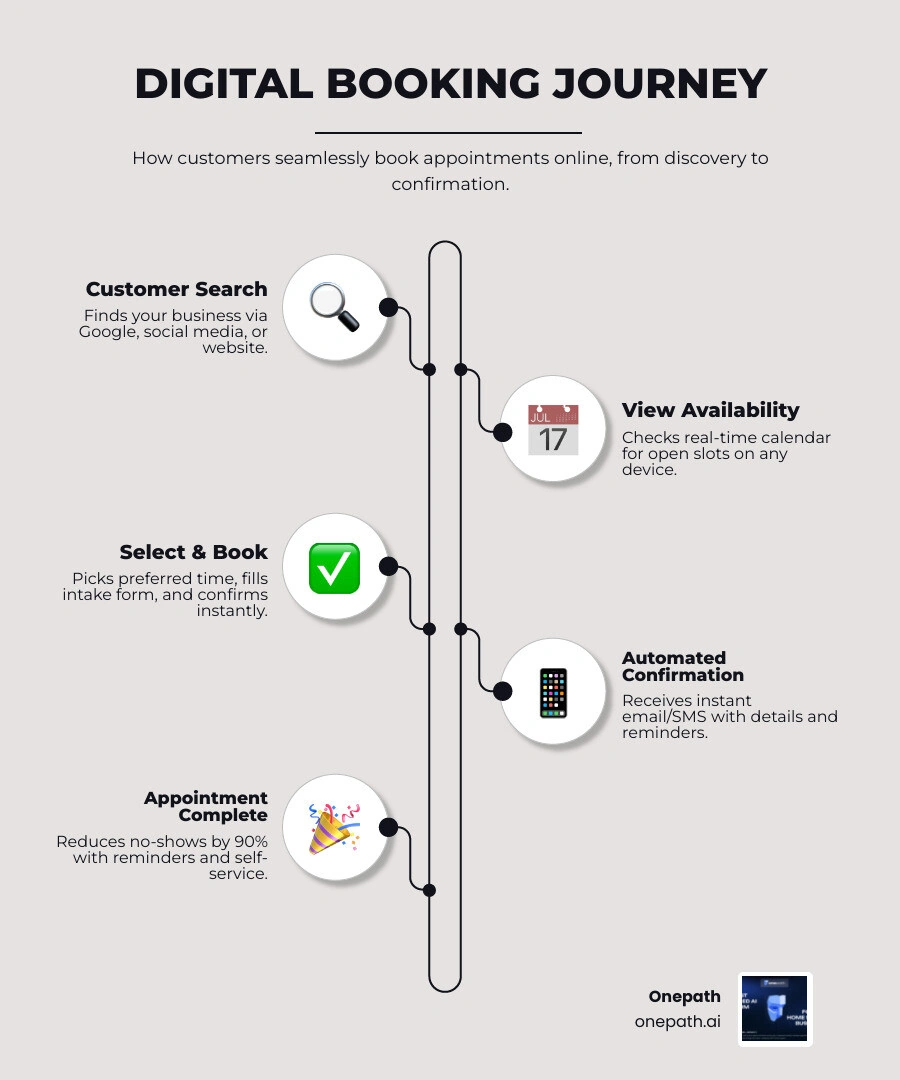
A web scheduler for small business is software that lets your customers book appointments online — anytime, from any device — without calling your office or waiting for a callback. By implementing the right automation tools, you can ensure your business stays open for bookings even when you are out in the field.
If you run a home service business — HVAC, plumbing, cleaning, or anything in between — your customers expect to book fast and on their own terms. But most small service businesses are still relying on phone calls, paper calendars, and back-and-forth texts to manage their schedule. That creates a messy, slow process that loses leads the moment someone has to wait for a response.
The numbers tell a clear story. No-show rates drop by as much as 90% when automated reminders are in place. And 61% of customers prefer to handle simple tasks — like booking an appointment — through self-service rather than talking to someone. When your schedule lives in a spreadsheet or a notebook, none of that is possible.
The good news is that web scheduling software solves these problems quickly, and many tools are built specifically with small business owners in mind. This guide walks you through how to automate your service business with the right web scheduler — so you spend less time managing your calendar and more time doing the work.
Why Your Company Needs a Web Scheduler for Small Business
In April 2026, the speed of your response is often the deciding factor in whether you win a job or lose it to another provider. When we look at the traditional way of handling appointments—answering the phone while on a job site, writing details on a notepad, and then manually entering them into a calendar later—it is easy to see where things go wrong.
A Web Scheduler acts as a digital gatekeeper for your business. It eliminates the "manual errors" that happen when you mishear a phone number or forget to write down a time. One of the biggest headaches for any service provider is the double booking. Nothing hurts your reputation more than showing up to a customer's house only to realize you were supposed to be across town ten minutes ago.
Implementing a web scheduler for small business provides immediate administrative relief. Instead of spending hours every evening playing "phone tag" to confirm times, the software handles the heavy lifting. It allows for better resource allocation, ensuring that your technicians are scheduled based on their actual availability and proximity. By syncing your digital calendar with your real-world movements, you create a seamless flow of work that keeps the business running like a well-oiled machine.
Essential Features for Service Automation
Not all scheduling tools are created equal. When you are looking to automate, you need more than just a digital calendar; you need a system that understands the nuances of the service industry. According to our Automated Scheduling AI Complete Guide, the most effective systems offer a combination of client-facing ease and back-end power.
Key features to prioritize include:
• Real-Time Availability: The system must show exactly when you are free. If you book a personal appointment on your phone, the web scheduler should instantly "gray out" that slot on your website.
• Calendar Integration: It should play nicely with the tools you already use, such as your existing digital calendars.
• Intake Forms: Don't just book a time; get the details. Whether it's the type of HVAC unit or the number of rooms to be cleaned, intake forms ensure you arrive prepared.
• Payment Processing: Many modern tools allow you to take deposits or full payments upfront, which secures the customer's commitment.
• Mobile Accessibility: As a business owner in the USA, you are rarely sitting behind a desk. You need an app that lets you manage your day from the truck.
Key Features of a Web Scheduler for Small Business
The "secret sauce" of a great web scheduler for small business is its ability to communicate without you lifting a finger. This is where Appointment Booking Assistance Complete Guide insights become invaluable. Automated reminders are the most critical feature for maintaining a healthy bottom line.
These systems send out SMS notifications and email alerts at strategic intervals—perhaps 24 hours before the visit and again two hours before arrival. This keeps your business top-of-mind and ensures the homeowner is actually there to let you in.
Reducing No-Shows with Timely Reminders
No-shows are more than just an annoyance; they are a direct hit to your revenue. Research shows that timely reminders can drop no-show rates by a staggering 90%. By using AI-Powered Appointment Booking, you can even automate the rescheduling process.
If a customer realizes they can't make it, your web scheduler should provide a "rescheduling link" right in the reminder text. This encourages customer accountability. Instead of "ghosting" you, they can move the appointment to a new time that works for everyone. You can also implement cancellation policies that require a 24-hour notice, or even collect a small deposit at the time of booking to ensure the customer is serious about the service.
Implementation Best Practices for Service Teams
Moving from a paper book to a digital system can feel daunting, but following a few best practices from our Appointment Booking Assistance Guide Small Business will make the transition smooth.
First, always build in "buffer times." If a plumbing repair usually takes an hour, schedule it for 90 minutes. This gives your team time to travel, grab a coffee, or handle unexpected complications without throwing the entire day's schedule into chaos.
Next, make it easy for people to find your booking link. Embed it prominently on your website, add it to your social media profiles, and include it in your email signature. The goal is to make booking an appointment as easy as ordering a pizza.
How to Choose a Web Scheduler for Small Business Success
When selecting your tool, consider your specific industry fit. A hair salon has different needs than a roofing company. For home services, scalability is key. You might be a "man with a van" today, but you want a tool that can handle five trucks next year.
Look for a user-friendly interface—both for you and your customers. If the booking process takes more than three clicks, you will lose people. Finally, ensure the tool offers CRM integration. This allows you to keep a history of every customer, what work you did for them, and when they are due for their next maintenance visit. Tools that offer Instant Booking AI are particularly effective at converting late-night website visitors into confirmed morning appointments.
Frequently Asked Questions about Web Schedulers
How do web schedulers prevent double bookings?
Modern web schedulers use real-time sync technology. When a customer picks a slot on your website, the software immediately checks your connected digital calendars. If there is a conflict—even a personal one you just added—that slot becomes unavailable to the public. Advanced conflict detection rules also allow you to set "maximum appointments per hour" if you have multiple staff members, ensuring you never over-extend your team.
Can customers book appointments outside of business hours?
Yes! This is one of the biggest benefits. Statistics show that a large percentage of home service inquiries happen in the evening when the homeowner is finally off work. A web scheduler for small business provides 24/7 access. While you are sleeping, a customer can visit your site, see your availability, and receive an automated confirmation. For those who prefer a more interactive experience, an AI Voice Agent for Appointments can even handle phone bookings after hours, ensuring you never miss a lead.
Is it difficult to set up a web scheduler?
Not at all. Most platforms offer guided onboarding to walk you through the process. You can often import your existing customer list via a CSV file to get started quickly. Configuration usually involves setting your working hours, listing your services, and then "embedding" a small piece of code (a widget) onto your website. If you're looking for a deeper dive into the setup process, our AI Appointment Booking Assistance Complete Guide covers everything from basic configuration to advanced AI integrations.
Conclusion
Automating your schedule is no longer a luxury; it is a requirement for staying competitive in the modern service market. By moving away from manual entry and embracing a web scheduler for small business, you reclaim your time and provide a professional experience that customers love.
At Onepath, we take this automation a step further. Our AI Lead Manager and all-in-one CRM are designed specifically for home service businesses in the USA. We don't just give you a calendar; we provide a system that instantly responds to leads, schedules appointments, and ensures you have full visibility of the customer journey. With our 72-hour setup and 24/7 human support, we make sure no lead is ever lost.
Ready to transform your sales process? Explore how our AI Sales Assistant can help you close more deals while you focus on the work that matters.
Why Running a Service Business Without a Web Scheduler Is Costing You Leads
A web scheduler for small business is software that lets your customers book appointments online — anytime, from any device — without calling your office or waiting for a callback. By implementing the right automation tools, you can ensure your business stays open for bookings even when you are out in the field.
If you run a home service business — HVAC, plumbing, cleaning, or anything in between — your customers expect to book fast and on their own terms. But most small service businesses are still relying on phone calls, paper calendars, and back-and-forth texts to manage their schedule. That creates a messy, slow process that loses leads the moment someone has to wait for a response.
The numbers tell a clear story. No-show rates drop by as much as 90% when automated reminders are in place. And 61% of customers prefer to handle simple tasks — like booking an appointment — through self-service rather than talking to someone. When your schedule lives in a spreadsheet or a notebook, none of that is possible.
The good news is that web scheduling software solves these problems quickly, and many tools are built specifically with small business owners in mind. This guide walks you through how to automate your service business with the right web scheduler — so you spend less time managing your calendar and more time doing the work.
Why Your Company Needs a Web Scheduler for Small Business
In April 2026, the speed of your response is often the deciding factor in whether you win a job or lose it to another provider. When we look at the traditional way of handling appointments—answering the phone while on a job site, writing details on a notepad, and then manually entering them into a calendar later—it is easy to see where things go wrong.
A Web Scheduler acts as a digital gatekeeper for your business. It eliminates the "manual errors" that happen when you mishear a phone number or forget to write down a time. One of the biggest headaches for any service provider is the double booking. Nothing hurts your reputation more than showing up to a customer's house only to realize you were supposed to be across town ten minutes ago.
Implementing a web scheduler for small business provides immediate administrative relief. Instead of spending hours every evening playing "phone tag" to confirm times, the software handles the heavy lifting. It allows for better resource allocation, ensuring that your technicians are scheduled based on their actual availability and proximity. By syncing your digital calendar with your real-world movements, you create a seamless flow of work that keeps the business running like a well-oiled machine.
Essential Features for Service Automation
Not all scheduling tools are created equal. When you are looking to automate, you need more than just a digital calendar; you need a system that understands the nuances of the service industry. According to our Automated Scheduling AI Complete Guide, the most effective systems offer a combination of client-facing ease and back-end power.
Key features to prioritize include:
- Real-Time Availability: The system must show exactly when you are free. If you book a personal appointment on your phone, the web scheduler should instantly "gray out" that slot on your website.
- Calendar Integration: It should play nicely with the tools you already use, such as your existing digital calendars.
- Intake Forms: Don't just book a time; get the details. Whether it's the type of HVAC unit or the number of rooms to be cleaned, intake forms ensure you arrive prepared.
- Payment Processing: Many modern tools allow you to take deposits or full payments upfront, which secures the customer's commitment.
- Mobile Accessibility: As a business owner in the USA, you are rarely sitting behind a desk. You need an app that lets you manage your day from the truck.
Key Features of a Web Scheduler for Small Business
The "secret sauce" of a great web scheduler for small business is its ability to communicate without you lifting a finger. This is where Appointment Booking Assistance Complete Guide insights become invaluable. Automated reminders are the most critical feature for maintaining a healthy bottom line.
These systems send out SMS notifications and email alerts at strategic intervals—perhaps 24 hours before the visit and again two hours before arrival. This keeps your business top-of-mind and ensures the homeowner is actually there to let you in.
Reducing No-Shows with Timely Reminders
No-shows are more than just an annoyance; they are a direct hit to your revenue. Research shows that timely reminders can drop no-show rates by a staggering 90%. By using AI-Powered Appointment Booking, you can even automate the rescheduling process.
If a customer realizes they can't make it, your web scheduler should provide a "rescheduling link" right in the reminder text. This encourages customer accountability. Instead of "ghosting" you, they can move the appointment to a new time that works for everyone. You can also implement cancellation policies that require a 24-hour notice, or even collect a small deposit at the time of booking to ensure the customer is serious about the service.
Implementation Best Practices for Service Teams
Moving from a paper book to a digital system can feel daunting, but following a few best practices from our Appointment Booking Assistance Guide Small Business will make the transition smooth.
First, always build in "buffer times." If a plumbing repair usually takes an hour, schedule it for 90 minutes. This gives your team time to travel, grab a coffee, or handle unexpected complications without throwing the entire day's schedule into chaos.
Next, make it easy for people to find your booking link. Embed it prominently on your website, add it to your social media profiles, and include it in your email signature. The goal is to make booking an appointment as easy as ordering a pizza.
How to Choose a Web Scheduler for Small Business Success
When selecting your tool, consider your specific industry fit. A hair salon has different needs than a roofing company. For home services, scalability is key. You might be a "man with a van" today, but you want a tool that can handle five trucks next year.
Look for a user-friendly interface—both for you and your customers. If the booking process takes more than three clicks, you will lose people. Finally, ensure the tool offers CRM integration. This allows you to keep a history of every customer, what work you did for them, and when they are due for their next maintenance visit. Tools that offer Instant Booking AI are particularly effective at converting late-night website visitors into confirmed morning appointments.
Frequently Asked Questions about Web Schedulers
How do web schedulers prevent double bookings?
Modern web schedulers use real-time sync technology. When a customer picks a slot on your website, the software immediately checks your connected digital calendars. If there is a conflict—even a personal one you just added—that slot becomes unavailable to the public. Advanced conflict detection rules also allow you to set "maximum appointments per hour" if you have multiple staff members, ensuring you never over-extend your team.
Can customers book appointments outside of business hours?
Yes! This is one of the biggest benefits. Statistics show that a large percentage of home service inquiries happen in the evening when the homeowner is finally off work. A web scheduler for small business provides 24/7 access. While you are sleeping, a customer can visit your site, see your availability, and receive an automated confirmation. For those who prefer a more interactive experience, an AI Voice Agent for Appointments can even handle phone bookings after hours, ensuring you never miss a lead.
Is it difficult to set up a web scheduler?
Not at all. Most platforms offer guided onboarding to walk you through the process. You can often import your existing customer list via a CSV file to get started quickly. Configuration usually involves setting your working hours, listing your services, and then "embedding" a small piece of code (a widget) onto your website. If you're looking for a deeper dive into the setup process, our AI Appointment Booking Assistance Complete Guide covers everything from basic configuration to advanced AI integrations.
Conclusion
Automating your schedule is no longer a luxury; it is a requirement for staying competitive in the modern service market. By moving away from manual entry and embracing a web scheduler for small business, you reclaim your time and provide a professional experience that customers love.
At Onepath, we take this automation a step further. Our AI Lead Manager and all-in-one CRM are designed specifically for home service businesses in the USA. We don't just give you a calendar; we provide a system that instantly responds to leads, schedules appointments, and ensures you have full visibility of the customer journey. With our 72-hour setup and 24/7 human support, we make sure no lead is ever lost.
Ready to transform your sales process? Explore how our AI Sales Assistant can help you close more deals while you focus on the work that matters.
Boost Your Lead Conversions. Start Using Onepath Today.
Onepath is your AI Lead Manager, built by tech experts and home service pros. It responds instantly, schedules appointments, personalizes customer interactions, and ensures no lead slips through the cracks—backed by 24/7 human support.
[ Schedule Discovery call ].webp)