.svg)

.webp)
Why Finding the Best Yelp Integration Platform Can Make or Break Your Lead Pipeline
The best Yelp integration platform for your business captures every inbound lead, responds instantly, and routes that contact into your workflow automatically. Here is a quick comparison of the primary integration types:
• No-Code Automation — Best For: General workflow teams — Key Strength: Connects Yelp Leads to thousands of business apps
• AI Lead Management — Best For: Home service businesses — Key Strength: AI-powered instant response and automated follow-up
• Review Monitoring — Best For: Reputation management teams — Key Strength: Full review text import and sentiment analysis
• Unified APIs — Best For: Developer and technical teams — Key Strength: Direct API integration with managed authentication
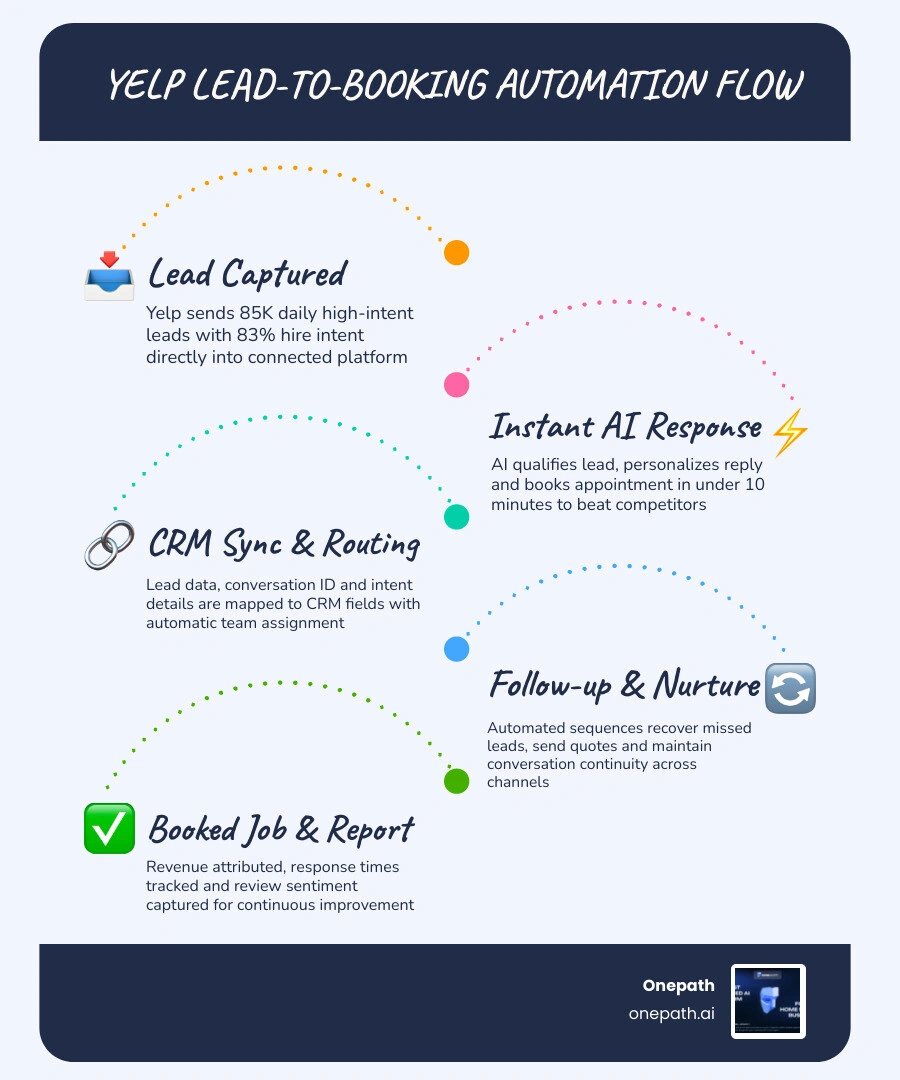
Yelp sees over 76 million unique visitors every month, with more than 85,000 project requests sent to businesses daily. Furthermore, 83% of users hire a business they find on the platform. This represents a massive volume of high-intent leads.
However, these leads go cold quickly. Yelp displays response times on business listings in 10-minute increments, meaning prospects see exactly how fast you reply. If your team manually checks an inbox and copies details into a spreadsheet hours later, you lose jobs to faster competitors.
Choosing the right Yelp integration connects Yelp directly to your CRM, messaging apps, and booking systems so no lead slips through the cracks.
How to Choose the Best Yelp Integration Platform in 2026
The best Yelp integration platform fits the way your team sells, schedules, follows up, and reports.
In 2026, Yelp integrations generally fall into a few categories:
• No-code automation platforms that move lead data into spreadsheets, CRMs, and messaging apps.
• AI lead management platforms that respond, qualify, follow up, and book appointments.
• Review monitoring platforms that track reviews, sentiment, and customer feedback.
• Developer and API platforms that use Yelp data for custom applications and local intelligence.
• Multi-location dashboards that centralize inboxes, permissions, and reporting.
When evaluating Yelp-connected workflows, consider these key questions:
1. How fast can the system respond to a new lead?
2. Can it sync lead details into your CRM automatically?
3. Does it support two-way messaging or only one-way notifications?
4. Can it handle delayed phone number availability?
5. Does it preserve the Yelp lead ID and conversation ID?
6. Can it route leads by location, service area, urgency, or job type?
7. Does it support human handoff when needed?
8. Can you see the full customer journey from inquiry to booked job?
9. Does it help monitor reviews and customer feedback?
10. Is the setup realistic for your team without weeks of technical work?
For a broader breakdown of lead capture strategy, our Multi-Channel Lead Capture Guide explains how Yelp fits into a wider system including calls, forms, chats, and texts.
Best Yelp Integration Platform Features for Real-Time Lead Syncing
Speed-to-lead is critical. A strong integration captures and routes leads in near real time. Look for support for these Yelp-related triggers and actions:
• New lead and consumer message triggers
• Phone availability updates
• Lead and business detail retrieval
• Message creation, replies, and mark-as-read actions
The phone availability trigger is especially important. Yelp lead contact data often arrives in stages. A lead may appear before a verified phone number is available. Your workflow must update the original CRM record later instead of creating a duplicate contact.
A quality real-time sync preserves the Yelp lead ID, conversation ID, lead source, business location, customer name, service category, and message history. This data should flow directly into your lead pipeline and dispatch workflow.
Best Yelp Integration Platform for AI-Powered Conversations
AI-powered Yelp integrations solve two major lead problems: late responses and inconsistent follow-up. A strong AI lead conversation system should:
• Respond instantly to new Yelp messages.
• Ask qualifying questions to identify the service needed.
• Capture the customer's location and timing.
• Route urgent jobs differently from standard inquiries.
• Offer appointment options and send reminders.
• Hand off to a human when necessary while keeping the conversation visible in the CRM.
At Onepath, our AI Lead Manager is built for this exact challenge. We help home service teams instantly respond to leads, personalize interactions, schedule appointments, and maintain visibility across the customer journey. Learn more in our AI Lead Management Solutions Guide.
What to Prioritize Before Connecting Yelp to Your CRM
Before connecting Yelp to your CRM, define your workflow to avoid moving chaos faster. Prioritize these setup decisions:
• Field mapping: Map Yelp fields directly to your CRM fields.
• Duplicate prevention: Match records by phone, email, or lead ID.
• Consent tracking: Record whether a customer opted in to share contact data.
• Source attribution: Tag every lead as Yelp for clean ROI reporting.
• Routing rules: Send urgent or location-specific jobs to the right team member.
• Message ownership: Define when AI responds and when a human takes over.
For a deeper view of how AI fits across multiple lead sources, see our Multi-Channel Lead Capture AI Guide.
Yelp Integration Platform Roundup by Use Case
Not every Yelp integration solves the same problem. Some focus on data movement, some on conversations, and others on reviews or custom development.
• No-code automation — Ideal Use Case: Simple lead routing and app connections — Best-Fit Business Need: Send Yelp leads to CRMs, spreadsheets, or task tools
• AI lead management — Ideal Use Case: Fast lead response and booking support — Best-Fit Business Need: Respond, qualify, schedule, and follow up automatically
• Review monitoring — Ideal Use Case: Reputation management and customer insights — Best-Fit Business Need: Track reviews, analyze sentiment, and flag urgent feedback
• Unified API — Ideal Use Case: Custom software and data infrastructure — Best-Fit Business Need: Build Yelp data into internal tools or AI systems
• Reputation dashboards — Ideal Use Case: Service quality and brand monitoring — Best-Fit Business Need: Compare feedback trends and manage review workflows
• Agency workflows — Ideal Use Case: Multiple accounts or locations — Best-Fit Business Need: Centralized access, permissions, and reporting
• Multi-location operations — Ideal Use Case: Branch-level routing and benchmarking — Best-Fit Business Need: Route leads by location and compare performance
No-Code Automation Platforms
No-code automation tools are the easiest starting point for simple Yelp lead workflows. They are useful when a team wants to connect Yelp to spreadsheets, CRMs, internal chat apps, or task systems without writing custom code.
Common no-code Yelp workflows include:
• Creating a CRM lead when a new Yelp inquiry arrives.
• Adding new Yelp lead details to a spreadsheet.
• Notifying a team channel when a consumer sends a message.
• Updating an existing lead record when a verified phone number becomes available.
The advantage is speed of setup. However, no-code tools require careful configuration to avoid duplicate records or broken message threads. For home services, ensure your workflow supports appointment routing and urgent alerts. Our Zapier Integration for Home Services article explains how automation supports service teams without forcing staff to bounce between tabs.
AI Lead Management Platforms
AI lead management platforms are the ideal fit when Yelp is a primary revenue channel. These platforms help businesses reply immediately, qualify customers, collect job details, schedule appointments, and follow up automatically.
For home service businesses, this matters because Yelp leads have strong intent. The first helpful response often wins the job. An AI lead management system removes repetitive work, protects response times, and provides clean handoffs to your team.
At Onepath, we focus on this complete lead journey: instant response, CRM visibility, appointment scheduling, and 24/7 human support. Our AI Lead Manager Complete Guide explains how this system prevents lost leads across channels.
Review Monitoring and Reputation Platforms
Yelp is also a powerful feedback engine. Review monitoring platforms help businesses track customer sentiment, identify patterns, and respond faster. These systems support review syncing, star rating tracking, sentiment analysis, and urgency detection.
For home services, review monitoring can surface comments about punctuality, communication, and job quality. Turning feedback into operational improvement helps resolve workflow issues before they impact your reputation.
Unified API and Developer Platforms
Developer-focused Yelp integrations are best for teams building custom applications, internal dashboards, or data products. These tools use APIs, OAuth, or direct API calls to access business search, review excerpts, and location data.
Developer platforms require technical discipline to manage API permissions, rate limits, error handling, and ongoing maintenance. For AI agents, Yelp data can help answer local business questions and analyze review sentiment.
Core Capabilities Every Yelp Integration Should Support
A complete Yelp integration should support more than basic lead forwarding. At a minimum, businesses should evaluate:
• Real-time lead capture and two-way messaging
• AI response assistance and CRM syncing
• Review monitoring and contact data compliance
• Phone availability updates and location management
• Role-based permissions and reporting
The closer Yelp is to your revenue engine, the more important these capabilities become. A simple notification is fine for low-volume workflows, but high-volume lead flows require a system that protects every step from inquiry to booked job.
Two-Way Messaging and Conversation Continuity
Two-way messaging is one of the most important features to confirm before choosing an integration. A basic integration may only send a notification when a new lead arrives, whereas a stronger integration preserves the full message thread and supports ongoing replies.
Look for support for:
• New consumer and business messages
• Reply and mark-as-read actions
• Message history and conversation threading
• Shared inbox views and human takeover
Conversation IDs are critical. If your system does not store the correct Yelp lead ID and conversation ID, replies may not stay connected to the original thread, creating confusion for your team and a poor experience for the customer.
Phone Number Masking, Unmasked Numbers, and Contact Compliance
Yelp contact data requires careful handling. Email addresses may be masked to protect personal information, and phone numbers depend on customer opt-in and verification.
Key compliance concepts include:
• Some contact fields may not be available immediately.
• Phone number availability may be delayed after initial lead submission.
• A dedicated phone availability trigger can update records when a verified number becomes available.
• Consent and opt-in status should be tracked and recorded.
• Data access should be limited to authorized personnel.
Compliance is part of building trust. If a customer shares contact information for a service request, that data must be used responsibly, stored securely, and managed according to your data retention policies.
Review Monitoring, Feedback Analysis, and Reputation Management
A strong Yelp integration helps you manage both leads and reputation. Useful review workflows include daily review syncs, alerts for low-star reviews, sentiment trend tracking, and location-level comparisons.
For home service teams, recurring review themes reveal operational opportunities. Comments about communication, punctuality, or ease of booking help you refine your workflows and improve the customer experience.
Multi-Location and Agency Support
Multi-location businesses need more than a single inbox. They require routing, visibility, permissions, and accountability across locations. A good integration supports:
• Location-based lead routing
• Shared inboxes and role-based permissions
• Response time reporting and location filters
• Client or branch dashboards
Without location-aware workflows, leads can end up with the wrong team, causing delays and duplicate follow-ups. Clear permission controls ensure each account or location has defined ownership.
Best Yelp Integration Platform Fit by Industry and Business Model
Different industries require different Yelp workflows:
• Home services: Quote requests, emergency routing, appointment booking, and lead follow-up.
• Restaurants: Review monitoring, guest sentiment analysis, and local visibility.
• Healthcare and Wellness: Appointment inquiries, reputation monitoring, and customer communication.
• Agencies and Multi-Location Brands: Multi-account dashboards, permissions, and location benchmarking.
Best Yelp Integration Platform for Home Services, Restaurants, and Multi-Location Teams
For home services, the best fit is an AI lead management workflow connected to the CRM. HVAC, plumbing, roofing, and electrical businesses need fast responses, clear qualification, and automated appointment scheduling.
For restaurants, review monitoring and feedback analysis are the primary focus. A single review can reveal recurring service issues or menu trends.
For multi-location teams, routing and reporting matter most. Each location needs clean lead assignment, review visibility, and performance tracking. Home service companies can learn more in our AI for Home Services Contractors Guide, which explains how AI supports response speed and customer communication.
Home Services Lead Conversion Workflows
A practical Yelp workflow for home services operates as follows:
1. A homeowner submits a Yelp quote request or sends a message.
2. The integration captures the lead instantly.
3. AI responds with a helpful, personalized message.
4. The system asks for key details such as service need, location, and preferred timing.
5. The lead is routed to the correct pipeline or team.
6. The CRM record is created or updated.
7. If the phone number becomes available later, the record is updated instead of duplicated.
8. The system offers booking options or prompts staff to schedule.
9. Follow-ups continue automatically if the customer does not respond.
10. The full conversation remains visible for reporting and handoff.
This workflow prevents common failures like slow responses, missed messages, duplicate contacts, and unclear lead ownership. For more on building an AI advantage, see Competitive Advantage AI Home Services.
Restaurant and Hospitality Reputation Workflows
Restaurant and hospitality teams benefit from Yelp integrations focused on reputation intelligence. Useful workflows include alerting managers when low-star reviews appear, tagging feedback by category (food, service, atmosphere), and routing urgent complaints to the right team. The goal is to learn from feedback quickly enough to improve the next guest experience.
Multi-Location Reporting and ROI Measurement
Multi-location teams must measure Yelp performance to understand lead quality and operational efficiency. Track these key metrics:
• Speed-to-lead and first response rate
• Response time by location
• Booking rate and close rate
• Marketing ROI and revenue attribution
• Missed lead rate and follow-up completion
• Review rating trends and sentiment by location
The best reporting connects the dots from Yelp inquiry to booked appointment to completed job. If Yelp produces many inquiries but few booked jobs, the issue may be response speed, qualification, or follow-up. Integration data helps reveal the real story.
Frequently Asked Questions About Yelp Integration Platforms
What limitations should businesses expect with Yelp integrations?
Yelp integrations are powerful, but they have standard technical limitations, including:
• API limits and rate throttling: Endpoints restrict how much data can be retrieved or how often calls can be made.
• Field availability: Not every lead or business record includes every field.
• Masked contact data: Email addresses may be masked to protect personal data.
• Delayed phone verification: Phone numbers may become available only after customer opt-in and verification.
• Review excerpt limits: Some official API endpoints return excerpts rather than full review text.
• Message continuity requirements: Lead IDs and conversation IDs must be stored correctly to maintain threads.
The safest approach is to design workflows around real-world edge cases. Assume phone data may arrive late and build your system to handle those situations gracefully.
How do Yelp integrations improve ROI?
Yelp integrations improve ROI by converting more of the leads you already receive. The main benefits include:
• Faster response times and fewer missed leads
• Higher appointment booking rates
• More consistent follow-up sequences
• Cleaner CRM data and stronger source attribution
• Better team accountability and location-level reporting
Speed is the first win. If your team responds in minutes instead of hours, more customers stay engaged. Long-term, the biggest benefit is system visibility. When every Yelp lead is tracked from first message through booking and outcome, you can see exactly what is working.
At Onepath, this is where our all-in-one CRM and AI Lead Manager are especially useful for home service businesses. We help teams respond instantly, schedule appointments, and keep the full customer journey in view.
What future trends matter for Yelp integrations in 2026?
Yelp integrations are moving toward more conversational, AI-assisted, and privacy-conscious workflows. Important trends include:
• AI assistants that help users discover and contact local businesses.
• Conversational search that turns customer intent into direct booking paths.
• Automated booking integrations for appointment-based services.
• Unified inboxes combining Yelp with calls, texts, forms, and chats.
• AI lead qualification that captures urgency and job type automatically.
• Privacy-first data sharing with stronger consent and retention controls.
• Human-in-the-loop systems that combine AI speed with real support.
Conclusion
The best Yelp integration platform matches your workflow, protects your response time, and helps every lead move smoothly from first message to booked appointment.
For some businesses, that means simple no-code automation. For others, it means review monitoring, API access, or multi-location dashboards. For home service businesses, the strongest fit is an AI lead management system that responds instantly, qualifies customers, schedules appointments, and keeps the entire journey visible in the CRM.
As you evaluate Yelp integrations in 2026, focus on:
• Speed-to-lead and real-time CRM syncing
• Two-way messaging and AI-assisted responses
• Phone number handling and contact data compliance
• Review intelligence and multi-location routing
• Reporting and ROI visibility
At Onepath, we help home service businesses stop losing leads to slow responses and disconnected systems. Our AI Lead Manager and all-in-one CRM are designed for instant response, appointment scheduling, full customer journey visibility, 72-hour setup, and 24/7 human support.
If you are ready to build a Yelp-connected lead workflow that feels less like inbox babysitting and more like a real growth system, start here: Explore AI lead management for Yelp-connected workflows.
Why Finding the Best Yelp Integration Platform Can Make or Break Your Lead Pipeline
The best Yelp integration platform for your business captures every inbound lead, responds instantly, and routes that contact into your workflow automatically. Here is a quick comparison of the primary integration types:
| Platform Type | Best For | Key Strength |
|---|---|---|
| No-Code Automation | General workflow teams | Connects Yelp Leads to thousands of business apps |
| AI Lead Management | Home service businesses | AI-powered instant response and automated follow-up |
| Review Monitoring | Reputation management teams | Full review text import and sentiment analysis |
| Unified APIs | Developer and technical teams | Direct API integration with managed authentication |
Yelp sees over 76 million unique visitors every month, with more than 85,000 project requests sent to businesses daily. Furthermore, 83% of users hire a business they find on the platform. This represents a massive volume of high-intent leads.
However, these leads go cold quickly. Yelp displays response times on business listings in 10-minute increments, meaning prospects see exactly how fast you reply. If your team manually checks an inbox and copies details into a spreadsheet hours later, you lose jobs to faster competitors.
Choosing the right Yelp integration connects Yelp directly to your CRM, messaging apps, and booking systems so no lead slips through the cracks.
How to Choose the Best Yelp Integration Platform in 2026
The best Yelp integration platform fits the way your team sells, schedules, follows up, and reports.
In 2026, Yelp integrations generally fall into a few categories:
- No-code automation platforms that move lead data into spreadsheets, CRMs, and messaging apps.
- AI lead management platforms that respond, qualify, follow up, and book appointments.
- Review monitoring platforms that track reviews, sentiment, and customer feedback.
- Developer and API platforms that use Yelp data for custom applications and local intelligence.
- Multi-location dashboards that centralize inboxes, permissions, and reporting.
When evaluating Yelp-connected workflows, consider these key questions:
- How fast can the system respond to a new lead?
- Can it sync lead details into your CRM automatically?
- Does it support two-way messaging or only one-way notifications?
- Can it handle delayed phone number availability?
- Does it preserve the Yelp lead ID and conversation ID?
- Can it route leads by location, service area, urgency, or job type?
- Does it support human handoff when needed?
- Can you see the full customer journey from inquiry to booked job?
- Does it help monitor reviews and customer feedback?
- Is the setup realistic for your team without weeks of technical work?
For a broader breakdown of lead capture strategy, our Multi-Channel Lead Capture Guide explains how Yelp fits into a wider system including calls, forms, chats, and texts.
Best Yelp Integration Platform Features for Real-Time Lead Syncing
Speed-to-lead is critical. A strong integration captures and routes leads in near real time. Look for support for these Yelp-related triggers and actions:
- New lead and consumer message triggers
- Phone availability updates
- Lead and business detail retrieval
- Message creation, replies, and mark-as-read actions
The phone availability trigger is especially important. Yelp lead contact data often arrives in stages. A lead may appear before a verified phone number is available. Your workflow must update the original CRM record later instead of creating a duplicate contact.
A quality real-time sync preserves the Yelp lead ID, conversation ID, lead source, business location, customer name, service category, and message history. This data should flow directly into your lead pipeline and dispatch workflow.
Best Yelp Integration Platform for AI-Powered Conversations
AI-powered Yelp integrations solve two major lead problems: late responses and inconsistent follow-up. A strong AI lead conversation system should:
- Respond instantly to new Yelp messages.
- Ask qualifying questions to identify the service needed.
- Capture the customer's location and timing.
- Route urgent jobs differently from standard inquiries.
- Offer appointment options and send reminders.
- Hand off to a human when necessary while keeping the conversation visible in the CRM.
At Onepath, our AI Lead Manager is built for this exact challenge. We help home service teams instantly respond to leads, personalize interactions, schedule appointments, and maintain visibility across the customer journey. Learn more in our AI Lead Management Solutions Guide.
What to Prioritize Before Connecting Yelp to Your CRM
Before connecting Yelp to your CRM, define your workflow to avoid moving chaos faster. Prioritize these setup decisions:
- Field mapping: Map Yelp fields directly to your CRM fields.
- Duplicate prevention: Match records by phone, email, or lead ID.
- Consent tracking: Record whether a customer opted in to share contact data.
- Source attribution: Tag every lead as Yelp for clean ROI reporting.
- Routing rules: Send urgent or location-specific jobs to the right team member.
- Message ownership: Define when AI responds and when a human takes over.
For a deeper view of how AI fits across multiple lead sources, see our Multi-Channel Lead Capture AI Guide.
Yelp Integration Platform Roundup by Use Case
Not every Yelp integration solves the same problem. Some focus on data movement, some on conversations, and others on reviews or custom development.
| Platform Type | Ideal Use Case | Best-Fit Business Need |
|---|---|---|
| No-code automation | Simple lead routing and app connections | Send Yelp leads to CRMs, spreadsheets, or task tools |
| AI lead management | Fast lead response and booking support | Respond, qualify, schedule, and follow up automatically |
| Review monitoring | Reputation management and customer insights | Track reviews, analyze sentiment, and flag urgent feedback |
| Unified API | Custom software and data infrastructure | Build Yelp data into internal tools or AI systems |
| Reputation dashboards | Service quality and brand monitoring | Compare feedback trends and manage review workflows |
| Agency workflows | Multiple accounts or locations | Centralized access, permissions, and reporting |
| Multi-location operations | Branch-level routing and benchmarking | Route leads by location and compare performance |
No-Code Automation Platforms
No-code automation tools are the easiest starting point for simple Yelp lead workflows. They are useful when a team wants to connect Yelp to spreadsheets, CRMs, internal chat apps, or task systems without writing custom code.
Common no-code Yelp workflows include:
- Creating a CRM lead when a new Yelp inquiry arrives.
- Adding new Yelp lead details to a spreadsheet.
- Notifying a team channel when a consumer sends a message.
- Updating an existing lead record when a verified phone number becomes available.
The advantage is speed of setup. However, no-code tools require careful configuration to avoid duplicate records or broken message threads. For home services, ensure your workflow supports appointment routing and urgent alerts. Our Zapier Integration for Home Services article explains how automation supports service teams without forcing staff to bounce between tabs.
AI Lead Management Platforms
AI lead management platforms are the ideal fit when Yelp is a primary revenue channel. These platforms help businesses reply immediately, qualify customers, collect job details, schedule appointments, and follow up automatically.
For home service businesses, this matters because Yelp leads have strong intent. The first helpful response often wins the job. An AI lead management system removes repetitive work, protects response times, and provides clean handoffs to your team.
At Onepath, we focus on this complete lead journey: instant response, CRM visibility, appointment scheduling, and 24/7 human support. Our AI Lead Manager Complete Guide explains how this system prevents lost leads across channels.
Review Monitoring and Reputation Platforms
Yelp is also a powerful feedback engine. Review monitoring platforms help businesses track customer sentiment, identify patterns, and respond faster. These systems support review syncing, star rating tracking, sentiment analysis, and urgency detection.
For home services, review monitoring can surface comments about punctuality, communication, and job quality. Turning feedback into operational improvement helps resolve workflow issues before they impact your reputation.
Unified API and Developer Platforms
Developer-focused Yelp integrations are best for teams building custom applications, internal dashboards, or data products. These tools use APIs, OAuth, or direct API calls to access business search, review excerpts, and location data.
Developer platforms require technical discipline to manage API permissions, rate limits, error handling, and ongoing maintenance. For AI agents, Yelp data can help answer local business questions and analyze review sentiment.
Core Capabilities Every Yelp Integration Should Support
A complete Yelp integration should support more than basic lead forwarding. At a minimum, businesses should evaluate:
- Real-time lead capture and two-way messaging
- AI response assistance and CRM syncing
- Review monitoring and contact data compliance
- Phone availability updates and location management
- Role-based permissions and reporting
The closer Yelp is to your revenue engine, the more important these capabilities become. A simple notification is fine for low-volume workflows, but high-volume lead flows require a system that protects every step from inquiry to booked job.
Two-Way Messaging and Conversation Continuity
Two-way messaging is one of the most important features to confirm before choosing an integration. A basic integration may only send a notification when a new lead arrives, whereas a stronger integration preserves the full message thread and supports ongoing replies.
Look for support for:
- New consumer and business messages
- Reply and mark-as-read actions
- Message history and conversation threading
- Shared inbox views and human takeover
Conversation IDs are critical. If your system does not store the correct Yelp lead ID and conversation ID, replies may not stay connected to the original thread, creating confusion for your team and a poor experience for the customer.
Phone Number Masking, Unmasked Numbers, and Contact Compliance
Yelp contact data requires careful handling. Email addresses may be masked to protect personal information, and phone numbers depend on customer opt-in and verification.
Key compliance concepts include:
- Some contact fields may not be available immediately.
- Phone number availability may be delayed after initial lead submission.
- A dedicated phone availability trigger can update records when a verified number becomes available.
- Consent and opt-in status should be tracked and recorded.
- Data access should be limited to authorized personnel.
Compliance is part of building trust. If a customer shares contact information for a service request, that data must be used responsibly, stored securely, and managed according to your data retention policies.
Review Monitoring, Feedback Analysis, and Reputation Management
A strong Yelp integration helps you manage both leads and reputation. Useful review workflows include daily review syncs, alerts for low-star reviews, sentiment trend tracking, and location-level comparisons.
For home service teams, recurring review themes reveal operational opportunities. Comments about communication, punctuality, or ease of booking help you refine your workflows and improve the customer experience.
Multi-Location and Agency Support
Multi-location businesses need more than a single inbox. They require routing, visibility, permissions, and accountability across locations. A good integration supports:
- Location-based lead routing
- Shared inboxes and role-based permissions
- Response time reporting and location filters
- Client or branch dashboards
Without location-aware workflows, leads can end up with the wrong team, causing delays and duplicate follow-ups. Clear permission controls ensure each account or location has defined ownership.
Best Yelp Integration Platform Fit by Industry and Business Model
Different industries require different Yelp workflows:
- Home services: Quote requests, emergency routing, appointment booking, and lead follow-up.
- Restaurants: Review monitoring, guest sentiment analysis, and local visibility.
- Healthcare and Wellness: Appointment inquiries, reputation monitoring, and customer communication.
- Agencies and Multi-Location Brands: Multi-account dashboards, permissions, and location benchmarking.
Best Yelp Integration Platform for Home Services, Restaurants, and Multi-Location Teams
For home services, the best fit is an AI lead management workflow connected to the CRM. HVAC, plumbing, roofing, and electrical businesses need fast responses, clear qualification, and automated appointment scheduling.
For restaurants, review monitoring and feedback analysis are the primary focus. A single review can reveal recurring service issues or menu trends.
For multi-location teams, routing and reporting matter most. Each location needs clean lead assignment, review visibility, and performance tracking. Home service companies can learn more in our AI for Home Services Contractors Guide, which explains how AI supports response speed and customer communication.
Home Services Lead Conversion Workflows
A practical Yelp workflow for home services operates as follows:
- A homeowner submits a Yelp quote request or sends a message.
- The integration captures the lead instantly.
- AI responds with a helpful, personalized message.
- The system asks for key details such as service need, location, and preferred timing.
- The lead is routed to the correct pipeline or team.
- The CRM record is created or updated.
- If the phone number becomes available later, the record is updated instead of duplicated.
- The system offers booking options or prompts staff to schedule.
- Follow-ups continue automatically if the customer does not respond.
- The full conversation remains visible for reporting and handoff.
This workflow prevents common failures like slow responses, missed messages, duplicate contacts, and unclear lead ownership. For more on building an AI advantage, see Competitive Advantage AI Home Services.
Restaurant and Hospitality Reputation Workflows
Restaurant and hospitality teams benefit from Yelp integrations focused on reputation intelligence. Useful workflows include alerting managers when low-star reviews appear, tagging feedback by category (food, service, atmosphere), and routing urgent complaints to the right team. The goal is to learn from feedback quickly enough to improve the next guest experience.
Multi-Location Reporting and ROI Measurement
Multi-location teams must measure Yelp performance to understand lead quality and operational efficiency. Track these key metrics:
- Speed-to-lead and first response rate
- Response time by location
- Booking rate and close rate
- Marketing ROI and revenue attribution
- Missed lead rate and follow-up completion
- Review rating trends and sentiment by location
The best reporting connects the dots from Yelp inquiry to booked appointment to completed job. If Yelp produces many inquiries but few booked jobs, the issue may be response speed, qualification, or follow-up. Integration data helps reveal the real story.
Frequently Asked Questions About Yelp Integration Platforms
What limitations should businesses expect with Yelp integrations?
Yelp integrations are powerful, but they have standard technical limitations, including:
- API limits and rate throttling: Endpoints restrict how much data can be retrieved or how often calls can be made.
- Field availability: Not every lead or business record includes every field.
- Masked contact data: Email addresses may be masked to protect personal data.
- Delayed phone verification: Phone numbers may become available only after customer opt-in and verification.
- Review excerpt limits: Some official API endpoints return excerpts rather than full review text.
- Message continuity requirements: Lead IDs and conversation IDs must be stored correctly to maintain threads.
The safest approach is to design workflows around real-world edge cases. Assume phone data may arrive late and build your system to handle those situations gracefully.
How do Yelp integrations improve ROI?
Yelp integrations improve ROI by converting more of the leads you already receive. The main benefits include:
- Faster response times and fewer missed leads
- Higher appointment booking rates
- More consistent follow-up sequences
- Cleaner CRM data and stronger source attribution
- Better team accountability and location-level reporting
Speed is the first win. If your team responds in minutes instead of hours, more customers stay engaged. Long-term, the biggest benefit is system visibility. When every Yelp lead is tracked from first message through booking and outcome, you can see exactly what is working.
At Onepath, this is where our all-in-one CRM and AI Lead Manager are especially useful for home service businesses. We help teams respond instantly, schedule appointments, and keep the full customer journey in view.
What future trends matter for Yelp integrations in 2026?
Yelp integrations are moving toward more conversational, AI-assisted, and privacy-conscious workflows. Important trends include:
- AI assistants that help users discover and contact local businesses.
- Conversational search that turns customer intent into direct booking paths.
- Automated booking integrations for appointment-based services.
- Unified inboxes combining Yelp with calls, texts, forms, and chats.
- AI lead qualification that captures urgency and job type automatically.
- Privacy-first data sharing with stronger consent and retention controls.
- Human-in-the-loop systems that combine AI speed with real support.
Conclusion
The best Yelp integration platform matches your workflow, protects your response time, and helps every lead move smoothly from first message to booked appointment.
For some businesses, that means simple no-code automation. For others, it means review monitoring, API access, or multi-location dashboards. For home service businesses, the strongest fit is an AI lead management system that responds instantly, qualifies customers, schedules appointments, and keeps the entire journey visible in the CRM.
As you evaluate Yelp integrations in 2026, focus on:
- Speed-to-lead and real-time CRM syncing
- Two-way messaging and AI-assisted responses
- Phone number handling and contact data compliance
- Review intelligence and multi-location routing
- Reporting and ROI visibility
At Onepath, we help home service businesses stop losing leads to slow responses and disconnected systems. Our AI Lead Manager and all-in-one CRM are designed for instant response, appointment scheduling, full customer journey visibility, 72-hour setup, and 24/7 human support.
If you are ready to build a Yelp-connected lead workflow that feels less like inbox babysitting and more like a real growth system, start here: Explore AI lead management for Yelp-connected workflows.
Boost Your Lead Conversions. Start Using Onepath Today.
Onepath is your AI Lead Manager, built by tech experts and home service pros. It responds instantly, schedules appointments, personalizes customer interactions, and ensures no lead slips through the cracks—backed by 24/7 human support.
[ Schedule Discovery call ].webp)