.svg)

How to Put Your Home Improvement Business on Autopilot with Zapier
.webp)
Why Zapier Integration for Home Services Is a Game-Changer in 2026
Zapier integration for home services lets you automatically connect your scheduling, CRM, marketing, and communication tools — so data flows between them without anyone on your team lifting a finger.
Here's what it can do for your business at a glance:
• Capture new leads instantly — How Zapier Helps: Connect Facebook Lead Ads, Jotform, or Yelp directly to your CRM
• Schedule and dispatch jobs — How Zapier Helps: Sync new bookings to Google Calendar and notify technicians automatically
• Follow up with customers — How Zapier Helps: Trigger emails or SMS messages when a job is completed
• Track marketing ROI — How Zapier Helps: Send offline conversions to Google Ads from closed jobs
• Manage reviews — How Zapier Helps: Auto-reply to 5-star reviews or request feedback after service
If you run an HVAC, plumbing, electrical, or any other home service business, you already know the pain: leads slip through the cracks, technicians get dispatched with outdated info, and customers never hear back fast enough. The back-office chaos quietly costs you jobs and revenue every single week.
The good news? You don't need to hire a developer or overhaul your entire operation to fix it. Zapier connects 8,000+ apps — including the field service platforms most home service businesses already use — through a simple, visual, no-code workflow builder. The average user sets up their first automated workflow in under six minutes.
And the results add up fast. Home service professionals who lean into automation tools consistently report stronger revenue growth, better customer retention, and less time lost to manual data entry.
This guide walks you through exactly how to put those gains to work for your business.
Understanding Zapier Integration for Home Services
In 2026, the home service landscape is more competitive than ever. Customers expect instant responses, and your back-office needs to be a well-oiled machine. This is where Zapier comes in. Think of Zapier as a universal translator for your software. It allows different apps to talk to each other without requiring you to write a single line of code.
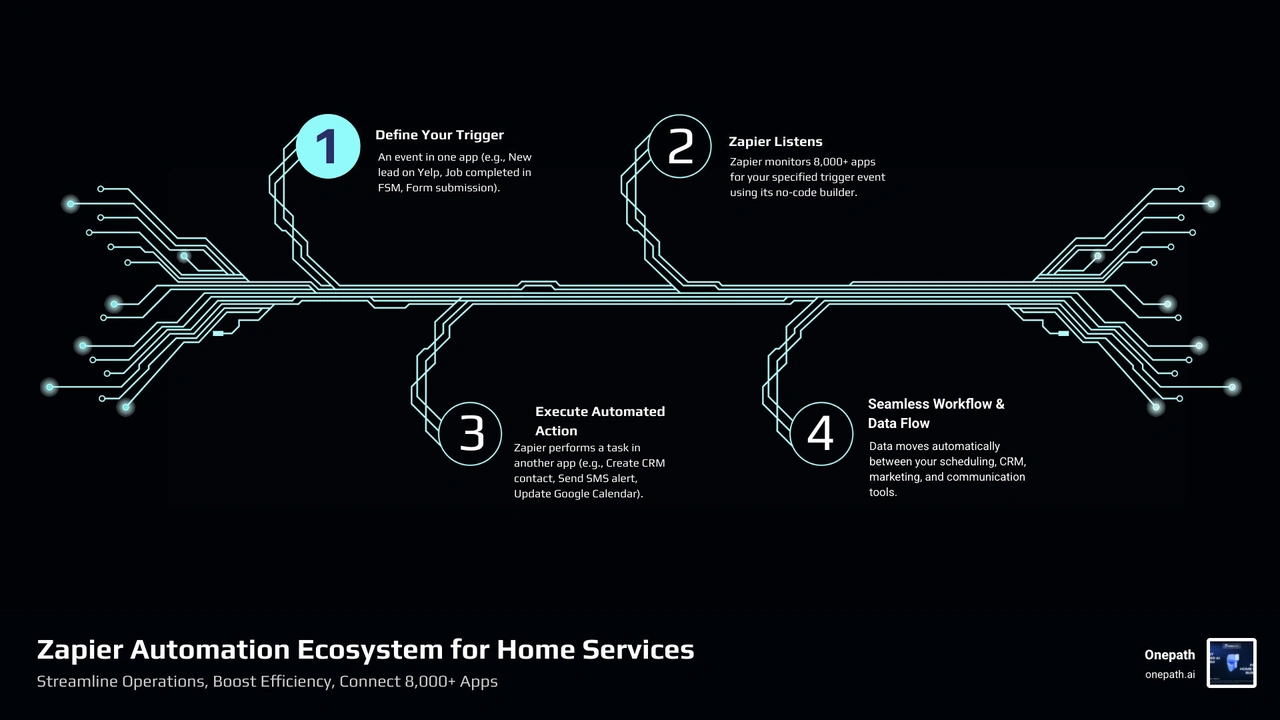
Zapier currently connects with over 8,000 apps and 450+ AI tools. For a plumbing or HVAC business, this means your website forms, your lead sources, and your dispatching software can finally live in harmony. The platform uses a simple "Trigger and Action" logic: when this happens in one app (the trigger), do that in another app (the action).
Setting this up is surprisingly easy thanks to a visual workflow builder. You don't need a computer science degree; you just need to know which tasks are eating up your time. For example, many pros start by setting up a Yelp Zapier Integration to ensure that every inquiry from a potential customer is immediately captured and acted upon.
The Role of Field Service Management Software
To make the most of a zapier integration for home services, you typically need a central hub—usually your Field Service Management (FSM) software. Platforms like Housecall Pro and ServiceTitan are the heavy hitters in this space. They handle the "meat" of your business: scheduling, dispatching, estimating, invoicing, and even credit card processing.
When you connect these hubs to Zapier, you unlock "superpowers." Instead of just being a place where you store data, your FSM becomes an active participant in your marketing and operations. It ensures that data synchronization happens in real-time, meaning your office staff and your technicians in the field are always looking at the same, accurate information.
Key Triggers and Actions for Home Service Providers
Understanding the specific triggers and actions available to you is the first step toward true automation. A "trigger" is the event that starts the chain reaction. In the home services world, common triggers include:
• New Scheduled Job: When a customer books an appointment online.
• New Completed Job: When a technician finishes a repair and closes the ticket.
• New Payment: When an invoice is paid in full.
• New Lead: When someone fills out a contact form on your site.
Once a trigger occurs, Zapier performs an "action." This could be creating a new customer profile in your CRM, sending an automated "on our way" text, or updating a lead's status.
• Hand-typing customer details from a lead form into your CRM. — Automated Zapier Workflow: Trigger: New Lead Form Submission -> Action: Create Customer in CRM.
• Calling a technician to tell them a job was finished so they can move to the next. — Automated Zapier Workflow: Trigger: Job Completed in FSM -> Action: Send Slack/SMS alert to Team.
• Manually emailing a review link to a customer three days after a job. — Automated Zapier Workflow: Trigger: Job Completed -> Action: Send Mailchimp/SMS Review Request.
High-Impact Automation Workflows for Modern Pros
So, where should you actually start? The most successful home service businesses focus on the "low-hanging fruit"—those repetitive tasks that occur every single day.
Popular "Zaps" for pros include routing leads from Facebook directly to a salesperson's phone, or automatically posting a "thank you" message to a Slack channel whenever a high-value job is sold. For those relying heavily on local lead generation, following a Yelp Zapier Integration Complete Guide can help bridge the gap between a lead clicking "request a quote" and your team actually booking the job.
Streamlining Lead Capture with Zapier Integration for Home Services
Speed to lead is everything. If you don't respond to a lead within five minutes, your chances of closing that deal drop significantly. Zapier allows you to connect sources like Facebook Lead Ads, Google Forms, and Jotform directly to your communication tools.
Imagine this: a homeowner sees your ad for a water heater replacement on Facebook at 9:00 PM. They fill out the lead form. Instead of that lead sitting in an email inbox until the next morning, Zapier triggers an instant SMS alert to your on-call manager and automatically adds the lead to your CRM with a "High Priority" tag. This reduction in response time is often the difference between a booked job and a lost opportunity.
Automating Scheduling and Dispatching
Scheduling can be a logistical nightmare, especially during the peak summer or winter months. Zapier helps by syncing your FSM software with tools like Google Calendar or Microsoft Outlook.
When a new job is scheduled in your primary software, it can automatically create an event on the technician's specific Google Calendar, complete with the customer's address and job notes. You can even automate "non-job" appointments—like vehicle maintenance or training sessions—so your dispatchers never accidentally overbook a crew.
Connecting Your Marketing Stack to Your Operations
Your marketing shouldn't happen in a vacuum. To scale, you need to know which ads are actually turning into paid invoices. By connecting your operations software to marketing tools like Google Ads and Mailchimp, you can close the loop on your ROI.
For instance, when a job is marked as "Completed" and "Paid" in your system, Zapier can send an "Offline Conversion" back to Google Ads. This tells Google's AI exactly which keywords led to real revenue, allowing you to spend your marketing budget more effectively.
Enhancing Customer Management via Zapier Integration for Home Services
Customer management is about more than just storing a phone number; it's about building a relationship. Zapier enables automated follow-ups that make you look like a much larger, more organized company.
You can set up a workflow where, one week after a service call, the customer receives an automated "How is everything working?" email. If they are a recurring customer, you can automatically add them to a loyalty program list in your email marketing software. This centralized data insight ensures that no customer feels forgotten, which is key to generating referrals.
Integrating Lead Sources and Review Platforms
Reviews are the lifeblood of home services. A 4.8-star rating will get you more calls than a 4.2-star rating every time. Zapier allows you to integrate review platforms like Yelp Leads and Google Business Profile into your daily workflow.
You can set up a "5-star alert" where, every time you receive a positive review, a notification is sent to your team's Slack or Discord channel to celebrate the win. Conversely, you can automate a process where any review under three stars immediately creates a "High Priority" task in your CRM for a manager to reach out and resolve the issue. This creates a feedback loop that protects your reputation while you focus on the work.
Advanced AI and Security Features for 2026
As we move through 2026, AI has become a standard part of the zapier integration for home services experience. You can now use AI Sales Agents to handle initial lead inquiries. These tools can use OpenAI's models to read an incoming lead's message, summarize the customer's problem (e.g., "Customer has a leaking pipe in the basement"), and even suggest which technician is best suited for the task based on historical data.
Security is also a top priority. For larger, enterprise-level home service franchises, Zapier offers robust governance features. This includes SOC 2 compliance and GDPR adherence, ensuring that your customers' sensitive data—like addresses and payment histories—is encrypted and handled with the highest level of care.
Frequently Asked Questions about Home Service Automation
How do I get started with Zapier for my business?
The best way to start is to pick one single problem. Is it lead entry? Is it following up on reviews? Once you identify the pain point, sign up for a free Zapier account and look for a "template" for the software you already use (like Housecall Pro or ServiceTitan). Most pros can have their first automation running in minutes.
Can I integrate multiple home service platforms at once?
Yes! While you likely use one main FSM, you might use different tools for specialized tasks—like ZenMaid for cleaning services or Jobber for landscaping. Zapier acts as the "glue" that allows you to sync data across multiple platforms, ensuring your customer records are consistent everywhere.
Is my customer data secure when using Zapier?
Absolutely. Zapier uses bank-level encryption (AES-256) and offers full audit trails. For businesses that need to meet specific regulatory standards, Zapier’s enterprise-grade security features provide peace of mind that your data is handled safely.
Conclusion
The days of manual data entry and missed phone calls are over. By embracing a zapier integration for home services, you're not just saving time—you're building a more resilient, scalable business. You are freeing your team to focus on what they do best: providing top-tier service to your community.
At Onepath, we understand that technology should work for you, not the other way around. Our AI Lead Manager and all-in-one CRM are designed specifically for the unique needs of home service providers. We offer a 72-hour setup that gives you full visibility into the customer journey, ensuring that no lead is ever lost. With our 24/7 human support, you have a partner dedicated to your growth every step of the way.
Ready to stop chasing paperwork and start growing your revenue? Put your business on autopilot with Onepath's Yelp Zapier Integration and see the difference that true automation can make.

Why Zapier Integration for Home Services Is a Game-Changer in 2026
Zapier integration for home services lets you automatically connect your scheduling, CRM, marketing, and communication tools — so data flows between them without anyone on your team lifting a finger.
Here's what it can do for your business at a glance:
| What You Want to Automate | How Zapier Helps |
|---|---|
| Capture new leads instantly | Connect Facebook Lead Ads, Jotform, or Yelp directly to your CRM |
| Schedule and dispatch jobs | Sync new bookings to Google Calendar and notify technicians automatically |
| Follow up with customers | Trigger emails or SMS messages when a job is completed |
| Track marketing ROI | Send offline conversions to Google Ads from closed jobs |
| Manage reviews | Auto-reply to 5-star reviews or request feedback after service |
If you run an HVAC, plumbing, electrical, or any other home service business, you already know the pain: leads slip through the cracks, technicians get dispatched with outdated info, and customers never hear back fast enough. The back-office chaos quietly costs you jobs and revenue every single week.
The good news? You don't need to hire a developer or overhaul your entire operation to fix it. Zapier connects 8,000+ apps — including the field service platforms most home service businesses already use — through a simple, visual, no-code workflow builder. The average user sets up their first automated workflow in under six minutes.
And the results add up fast. Home service professionals who lean into automation tools consistently report stronger revenue growth, better customer retention, and less time lost to manual data entry.
This guide walks you through exactly how to put those gains to work for your business.
Understanding Zapier Integration for Home Services
In 2026, the home service landscape is more competitive than ever. Customers expect instant responses, and your back-office needs to be a well-oiled machine. This is where Zapier comes in. Think of Zapier as a universal translator for your software. It allows different apps to talk to each other without requiring you to write a single line of code.
Zapier currently connects with over 8,000 apps and 450+ AI tools. For a plumbing or HVAC business, this means your website forms, your lead sources, and your dispatching software can finally live in harmony. The platform uses a simple "Trigger and Action" logic: when this happens in one app (the trigger), do that in another app (the action).
Setting this up is surprisingly easy thanks to a visual workflow builder. You don't need a computer science degree; you just need to know which tasks are eating up your time. For example, many pros start by setting up a Yelp Zapier Integration to ensure that every inquiry from a potential customer is immediately captured and acted upon.
The Role of Field Service Management Software
To make the most of a zapier integration for home services, you typically need a central hub—usually your Field Service Management (FSM) software. Platforms like Housecall Pro and ServiceTitan are the heavy hitters in this space. They handle the "meat" of your business: scheduling, dispatching, estimating, invoicing, and even credit card processing.
When you connect these hubs to Zapier, you unlock "superpowers." Instead of just being a place where you store data, your FSM becomes an active participant in your marketing and operations. It ensures that data synchronization happens in real-time, meaning your office staff and your technicians in the field are always looking at the same, accurate information.
Key Triggers and Actions for Home Service Providers
Understanding the specific triggers and actions available to you is the first step toward true automation. A "trigger" is the event that starts the chain reaction. In the home services world, common triggers include:
- New Scheduled Job: When a customer books an appointment online.
- New Completed Job: When a technician finishes a repair and closes the ticket.
- New Payment: When an invoice is paid in full.
- New Lead: When someone fills out a contact form on your site.
Once a trigger occurs, Zapier performs an "action." This could be creating a new customer profile in your CRM, sending an automated "on our way" text, or updating a lead's status.
| Manual Process | Automated Zapier Workflow |
|---|---|
| Hand-typing customer details from a lead form into your CRM. | Trigger: New Lead Form Submission -> Action: Create Customer in CRM. |
| Calling a technician to tell them a job was finished so they can move to the next. | Trigger: Job Completed in FSM -> Action: Send Slack/SMS alert to Team. |
| Manually emailing a review link to a customer three days after a job. | Trigger: Job Completed -> Action: Send Mailchimp/SMS Review Request. |
High-Impact Automation Workflows for Modern Pros
So, where should you actually start? The most successful home service businesses focus on the "low-hanging fruit"—those repetitive tasks that occur every single day.
Popular "Zaps" for pros include routing leads from Facebook directly to a salesperson's phone, or automatically posting a "thank you" message to a Slack channel whenever a high-value job is sold. For those relying heavily on local lead generation, following a Yelp Zapier Integration Complete Guide can help bridge the gap between a lead clicking "request a quote" and your team actually booking the job.
Streamlining Lead Capture with Zapier Integration for Home Services
Speed to lead is everything. If you don't respond to a lead within five minutes, your chances of closing that deal drop significantly. Zapier allows you to connect sources like Facebook Lead Ads, Google Forms, and Jotform directly to your communication tools.
Imagine this: a homeowner sees your ad for a water heater replacement on Facebook at 9:00 PM. They fill out the lead form. Instead of that lead sitting in an email inbox until the next morning, Zapier triggers an instant SMS alert to your on-call manager and automatically adds the lead to your CRM with a "High Priority" tag. This reduction in response time is often the difference between a booked job and a lost opportunity.
Automating Scheduling and Dispatching
Scheduling can be a logistical nightmare, especially during the peak summer or winter months. Zapier helps by syncing your FSM software with tools like Google Calendar or Microsoft Outlook.
When a new job is scheduled in your primary software, it can automatically create an event on the technician's specific Google Calendar, complete with the customer's address and job notes. You can even automate "non-job" appointments—like vehicle maintenance or training sessions—so your dispatchers never accidentally overbook a crew.
Connecting Your Marketing Stack to Your Operations
Your marketing shouldn't happen in a vacuum. To scale, you need to know which ads are actually turning into paid invoices. By connecting your operations software to marketing tools like Google Ads and Mailchimp, you can close the loop on your ROI.
For instance, when a job is marked as "Completed" and "Paid" in your system, Zapier can send an "Offline Conversion" back to Google Ads. This tells Google's AI exactly which keywords led to real revenue, allowing you to spend your marketing budget more effectively.
Enhancing Customer Management via Zapier Integration for Home Services
Customer management is about more than just storing a phone number; it's about building a relationship. Zapier enables automated follow-ups that make you look like a much larger, more organized company.
You can set up a workflow where, one week after a service call, the customer receives an automated "How is everything working?" email. If they are a recurring customer, you can automatically add them to a loyalty program list in your email marketing software. This centralized data insight ensures that no customer feels forgotten, which is key to generating referrals.
Integrating Lead Sources and Review Platforms
Reviews are the lifeblood of home services. A 4.8-star rating will get you more calls than a 4.2-star rating every time. Zapier allows you to integrate review platforms like Yelp Leads and Google Business Profile into your daily workflow.
You can set up a "5-star alert" where, every time you receive a positive review, a notification is sent to your team's Slack or Discord channel to celebrate the win. Conversely, you can automate a process where any review under three stars immediately creates a "High Priority" task in your CRM for a manager to reach out and resolve the issue. This creates a feedback loop that protects your reputation while you focus on the work.
Advanced AI and Security Features for 2026
As we move through 2026, AI has become a standard part of the zapier integration for home services experience. You can now use AI Sales Agents to handle initial lead inquiries. These tools can use OpenAI's models to read an incoming lead's message, summarize the customer's problem (e.g., "Customer has a leaking pipe in the basement"), and even suggest which technician is best suited for the task based on historical data.
Security is also a top priority. For larger, enterprise-level home service franchises, Zapier offers robust governance features. This includes SOC 2 compliance and GDPR adherence, ensuring that your customers' sensitive data—like addresses and payment histories—is encrypted and handled with the highest level of care.
Frequently Asked Questions about Home Service Automation
How do I get started with Zapier for my business?
The best way to start is to pick one single problem. Is it lead entry? Is it following up on reviews? Once you identify the pain point, sign up for a free Zapier account and look for a "template" for the software you already use (like Housecall Pro or ServiceTitan). Most pros can have their first automation running in minutes.
Can I integrate multiple home service platforms at once?
Yes! While you likely use one main FSM, you might use different tools for specialized tasks—like ZenMaid for cleaning services or Jobber for landscaping. Zapier acts as the "glue" that allows you to sync data across multiple platforms, ensuring your customer records are consistent everywhere.
Is my customer data secure when using Zapier?
Absolutely. Zapier uses bank-level encryption (AES-256) and offers full audit trails. For businesses that need to meet specific regulatory standards, Zapier’s enterprise-grade security features provide peace of mind that your data is handled safely.
Conclusion
The days of manual data entry and missed phone calls are over. By embracing a zapier integration for home services, you're not just saving time—you're building a more resilient, scalable business. You are freeing your team to focus on what they do best: providing top-tier service to your community.
At Onepath, we understand that technology should work for you, not the other way around. Our AI Lead Manager and all-in-one CRM are designed specifically for the unique needs of home service providers. We offer a 72-hour setup that gives you full visibility into the customer journey, ensuring that no lead is ever lost. With our 24/7 human support, you have a partner dedicated to your growth every step of the way.
Ready to stop chasing paperwork and start growing your revenue? Put your business on autopilot with Onepath's Yelp Zapier Integration and see the difference that true automation can make.
Boost Your Lead Conversions. Start Using Onepath Today.
Onepath is your AI Lead Manager, built by tech experts and home service pros. It responds instantly, schedules appointments, personalizes customer interactions, and ensures no lead slips through the cracks—backed by 24/7 human support.
[ Schedule Discovery call ].webp)