.svg)

.webp)
Why Appointment Booking Assistance for Small Business Is a Game-Changer

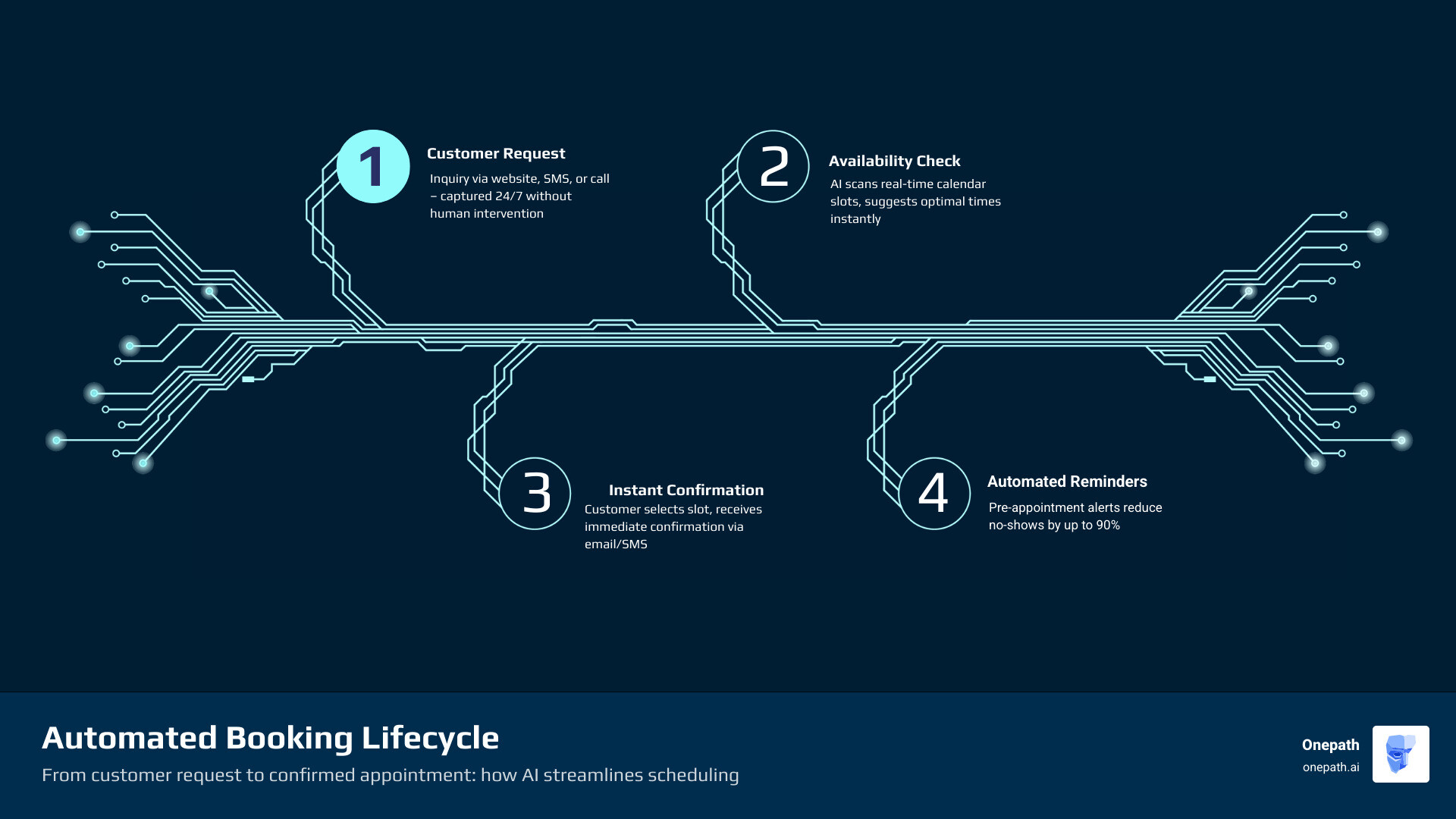
Appointment booking assistance for small business is the use of software or AI-powered tools to automate how customers schedule, confirm, and manage appointments — so you spend less time on admin and more time doing the actual work.
Here's what the right booking system does for you:
• Accepts bookings 24/7 — even while you're on a job or asleep
• Sends automatic reminders — cutting no-shows by up to 90%
• Eliminates back-and-forth — customers pick a time, confirm instantly, done
• Syncs with your calendar — no double-bookings, no missed slots
• Captures leads outside business hours — over half of all bookings happen after hours
If you run a home service business, you already know the pain. The phone rings while you're on a roof. A customer texts at 9pm wanting a quote. Your calendar lives in three different places. Leads fall through the cracks not because you're bad at your job — but because manual scheduling just doesn't scale.
Nearly half of all appointments are now booked online, and more than 70% of customers prefer booking that way over calling. The businesses that make it easy to book win the job. The ones that don't lose it to whoever responds faster.
The good news? Getting this under control doesn't require a big team or a complicated setup. The right appointment booking tools can have you running a smoother, more responsive operation in days — not months.
Appointment booking assistance for small business terms you need:
• ai appointment booking assistance
• appointment booking assistance
The Value of Appointment Booking Assistance for Small Business
As we move through 2026, the "sticky note graveyard" on your dashboard should be a thing of the past. For a growing business, time is the only resource you can't buy more of—unless you automate your scheduling. When we talk about the value of appointment booking assistance for small business, we aren't just talking about a digital calendar. We’re talking about a revenue engine.
One of the most immediate impacts is the dramatic reduction in no-shows. Statistics show that timely automated reminders can cut missed appointments by up to 90%. If you’re a contractor, a no-show isn't just a minor annoyance; it’s lost fuel, lost labor time, and a gap in your day that could have been filled by a paying customer. By using AI Automated Scheduling, you ensure that your "calendar density" remains high, meaning your team stays busy and your trucks stay on the road.
Beyond just keeping the schedule full, this technology acts as a virtual receptionist that never sleeps. Since more than half of all online bookings happen outside of standard business hours, a manual system is essentially "closed" when many of your customers are finally sitting down to handle their home maintenance chores. Providing Appointment Booking Assistance Complete Guide level service means you’re open for business 24/7, capturing revenue while your competitors are still checking their morning voicemails.
Enhancing Customer Experience through Self-Scheduling
In the modern service economy, convenience is a currency. If a homeowner has a leaky faucet or a broken AC unit, they don't want to play "phone tag" for three days. They want to know when you can show up, right now. Online self-scheduling provides that instant gratification.
By offering Instant Booking AI, you provide a user-friendly interface that works perfectly on mobile devices. Most customers are looking for help while on their phones. A mobile-optimized booking page allows them to see your real-time availability, select a service, and receive an instant confirmation. This transparency builds trust before you even arrive at their front door. It transforms the booking process from a chore into a seamless part of their day.
Reducing Operational Friction and No-Shows
Operational friction is the "sand in the gears" of your business. It’s the time spent calling a customer back to confirm a time, only to find out they’ve already hired someone else. It’s the manual data entry required to move a lead from a text message into your CRM.
Automated systems remove this friction by using SMS notifications and email alerts to keep everyone on the same page. When a client books, they get a text. Two hours before the appointment, they get another. This isn't just about being polite; it’s about protecting your bottom line. We’ve seen that businesses using these tools report massive drops in no-show rates. For a deeper look at how this works, check out our AI Appointment Booking Assistance Complete Guide. By automating these touches, you free up your staff to focus on high-value tasks—like actually performing the services that generate profit.
Essential Features of Modern Scheduling Tools
When you’re looking for the right tool, it’s easy to get overwhelmed by the "bells and whistles." However, for a small business in the USA, a few non-negotiable features will make or break your success. The most important is a robust calendar sync. Your booking tool must talk to your Google Calendar or Outlook integration in real-time. If you book a personal doctor's appointment on your private phone, your professional Web Scheduler should automatically block that time off so no one can book a service call while you’re out.
Another essential feature is integrated payment processing. Collecting a deposit or even a full payment at the time of booking dramatically increases the "commitment" of the customer. It streamlines your billing and ensures you aren't chasing down invoices weeks after the job is done. To learn more about how these pieces fit together, our Automated Scheduling AI Complete Guide breaks down the technical must-haves for modern pros.
Security and Compliance Standards
As a small business owner, you are responsible for the data your customers trust you with. This isn't just a "big tech" problem. Whether you're handling credit card info, home addresses, or even sensitive consultation notes, security is paramount.
You should look for tools that offer:
• SSL Encryption: To keep data transfers safe.
• GDPR and HIPAA Compliance: Even if you aren't in healthcare, HIPAA-level security ensures that client records are handled with the highest degree of privacy. This is especially vital for professional services, as noted in our guide on Appointment Booking Assistance for Law Firms.
• Secure Data Storage: Bank-level security protocols ensure that your customer list—your most valuable asset—is never compromised.
Workflow Integrations for Growing Teams
If you have more than one technician or a growing office staff, you need a system that supports multi-staff views. You need to see who is where, which truck is available, and how much "buffer time" is between jobs to account for USA traffic.
Integrating your booking system with your CRM (Customer Relationship Management) tool is a game-changer. It allows for automated follow-ups—sending a "Thank You" email or a request for a review 24 hours after the job is completed. For those in the trades, using something like an Automated Scheduling ServiceTitan AI Guide can help sync your field operations with your back-office scheduling seamlessly.
Implementing AI-Powered Appointment Booking Assistance for Small Business
Traditional scheduling tools are great, but AI-powered assistance is where the real magic happens. Traditional tools are passive—they wait for a customer to click a link. AI-powered tools, like the Onepath AI Lead Manager, are proactive. They can "read" a lead request, understand the intent, and propose the best possible time slot based on your real-time availability.
This is what we call AI Powered Appointment Booking. Instead of a customer staring at a blank calendar, the AI guides them. "I see you need a water heater repair. We have a technician in your neighborhood this Tuesday at 10 AM. Would that work for you?" This level of lead qualification ensures that by the time an appointment hits your calendar, the customer is ready to go. And with Onepath, you get the best of both worlds: 24/7 human support to back up the AI, ensuring no nuance is missed. Plus, we can get you set up in as little as 72 hours.
Transitioning from Manual to Automated Systems
Moving from a paper planner to a digital AI system can feel like a big leap, but it’s simpler than you think. The first step is data migration—importing your existing customer list (usually via a CSV file) so you don't lose your history.
Once your data is in, you set your "Availability Rules." This includes:
• Buffer Times: Adding 15-30 minutes between jobs so you aren't rushing.
• Minimum Notice: Ensuring someone can't book an emergency call for 5 minutes from now without you knowing.
• Service Durations: Setting realistic timeframes for different types of work.
For specific industries, like landscaping or arborists, you might need to account for weather or equipment. Our guide on AI Appointment Booking for Tree Service Companies covers these unique industry hurdles.
Measuring ROI and Scheduling Metrics
How do you know if your appointment booking assistance for small business is actually working? You look at the data. Modern systems provide dashboards that track:
• Booking Volume: Are you getting more appointments than before?
• Conversion Rates: Of the people who visit your booking page, how many actually schedule?
• Staff Utilization: Is one technician overbooked while another is sitting idle?
• Customer Retention: Are people coming back for recurring services?
By tracking these metrics, you can see the direct ROI (Return on Investment) of your software. For example, if the system helps you book just two extra jobs a month that you previously would have missed, it has likely paid for itself several times over. For more on maximizing these numbers, see our Ultimate AI Appointment Booking Guide - Garage Doors.
Industry-Specific Benefits of Automated Scheduling
Not every small business is the same. A hair salon has different needs than a HVAC company or a consultant. Here is a breakdown of how different industries leverage these tools:
• Salons & Spas — Primary Scheduling Need: Managing multiple staff/stations — Key Feature: Resource allocation (chairs/rooms)
• Consultants — Primary Scheduling Need: Timezone management — Key Feature: Video conferencing integration
• Home Services — Primary Scheduling Need: Dispatching & travel time — Key Feature: Buffer times & location mapping
• Fitness/Gyms — Primary Scheduling Need: Class & group bookings — Key Feature: Recurring appointment settings
• Healthcare — Primary Scheduling Need: Patient privacy — Key Feature: HIPAA compliance
For home service pros, the benefits are even more specific. If you’re in the cooling business, check out the AI Appointment Booking HVAC Guide to see how to handle seasonal surges. If you’re in flooring, our Ultimate AI Appointment Booking Guide - Flooring explains how to manage complex multi-day installation schedules without losing your mind.
Frequently Asked Questions about Appointment Booking Assistance for Small Business
How does automated booking reduce no-shows?
The primary weapon against no-shows is the automated reminder. By sending a text or email 24 hours and again 2 hours before the visit, you keep the appointment top-of-mind for the customer. Many systems also use "two-way SMS," allowing the customer to reply "C" to confirm or "R" to reschedule. This simple interaction has been shown to result in a 90% reduction in missed appointments because it makes it easy for the customer to communicate changes early. Learn more about the mechanics in our post on AI Automated Scheduling.
Is it difficult to integrate booking software with an existing website?
Not at all! Most modern tools provide "embeddable widgets." This is just a small piece of code you copy and paste onto your site—it’s about as hard as embedding a YouTube video. You can also use QR codes on your business cards or truck wraps that link directly to your Web Scheduler. Many businesses find they can be up and running with a basic setup in about 5 to 10 minutes.
Can AI-powered tools handle complex scheduling requests?
Yes, and that’s where they really shine. Modern AI uses "intent recognition" to understand what a customer is asking for. If a customer says, "I need an inspection, but only on Thursday mornings," the AI checks your real-time availability and proposes only the slots that fit that specific criteria. This prevents conflicts and ensures that you aren't manually sorting through requests. For a deeper dive into these "smart" features, visit our guide on AI Powered Appointment Booking.
Conclusion
At Onepath, we know that for a small business owner, your time is your most precious asset. You didn't start your company to spend six hours a day playing secretary. Our AI Lead Manager and all-in-one CRM are designed specifically to take that burden off your shoulders.
We provide a system that doesn't just "take a message"—it responds instantly to leads, qualifies them, and puts them on your calendar. With our 72-hour setup and full customer journey visibility, you’ll never have to wonder if a lead fell through the cracks again. We combine the speed of AI with the reliability of 24/7 human support to ensure your home service business runs like a well-oiled machine.
Ready to stop the scheduling chaos and start growing? Start your journey with an AI Sales Assistant today and see how easy it is to reclaim your time.

Why Appointment Booking Assistance for Small Business Is a Game-Changer
Appointment booking assistance for small business is the use of software or AI-powered tools to automate how customers schedule, confirm, and manage appointments — so you spend less time on admin and more time doing the actual work.
Here's what the right booking system does for you:
- Accepts bookings 24/7 — even while you're on a job or asleep
- Sends automatic reminders — cutting no-shows by up to 90%
- Eliminates back-and-forth — customers pick a time, confirm instantly, done
- Syncs with your calendar — no double-bookings, no missed slots
- Captures leads outside business hours — over half of all bookings happen after hours
If you run a home service business, you already know the pain. The phone rings while you're on a roof. A customer texts at 9pm wanting a quote. Your calendar lives in three different places. Leads fall through the cracks not because you're bad at your job — but because manual scheduling just doesn't scale.
Nearly half of all appointments are now booked online, and more than 70% of customers prefer booking that way over calling. The businesses that make it easy to book win the job. The ones that don't lose it to whoever responds faster.
The good news? Getting this under control doesn't require a big team or a complicated setup. The right appointment booking tools can have you running a smoother, more responsive operation in days — not months.
Appointment booking assistance for small business terms you need:
The Value of Appointment Booking Assistance for Small Business
As we move through 2026, the "sticky note graveyard" on your dashboard should be a thing of the past. For a growing business, time is the only resource you can't buy more of—unless you automate your scheduling. When we talk about the value of appointment booking assistance for small business, we aren't just talking about a digital calendar. We’re talking about a revenue engine.
One of the most immediate impacts is the dramatic reduction in no-shows. Statistics show that timely automated reminders can cut missed appointments by up to 90%. If you’re a contractor, a no-show isn't just a minor annoyance; it’s lost fuel, lost labor time, and a gap in your day that could have been filled by a paying customer. By using AI Automated Scheduling, you ensure that your "calendar density" remains high, meaning your team stays busy and your trucks stay on the road.
Beyond just keeping the schedule full, this technology acts as a virtual receptionist that never sleeps. Since more than half of all online bookings happen outside of standard business hours, a manual system is essentially "closed" when many of your customers are finally sitting down to handle their home maintenance chores. Providing Appointment Booking Assistance Complete Guide level service means you’re open for business 24/7, capturing revenue while your competitors are still checking their morning voicemails.
Enhancing Customer Experience through Self-Scheduling
In the modern service economy, convenience is a currency. If a homeowner has a leaky faucet or a broken AC unit, they don't want to play "phone tag" for three days. They want to know when you can show up, right now. Online self-scheduling provides that instant gratification.
By offering Instant Booking AI, you provide a user-friendly interface that works perfectly on mobile devices. Most customers are looking for help while on their phones. A mobile-optimized booking page allows them to see your real-time availability, select a service, and receive an instant confirmation. This transparency builds trust before you even arrive at their front door. It transforms the booking process from a chore into a seamless part of their day.
Reducing Operational Friction and No-Shows
Operational friction is the "sand in the gears" of your business. It’s the time spent calling a customer back to confirm a time, only to find out they’ve already hired someone else. It’s the manual data entry required to move a lead from a text message into your CRM.
Automated systems remove this friction by using SMS notifications and email alerts to keep everyone on the same page. When a client books, they get a text. Two hours before the appointment, they get another. This isn't just about being polite; it’s about protecting your bottom line. We’ve seen that businesses using these tools report massive drops in no-show rates. For a deeper look at how this works, check out our AI Appointment Booking Assistance Complete Guide. By automating these touches, you free up your staff to focus on high-value tasks—like actually performing the services that generate profit.
Essential Features of Modern Scheduling Tools
When you’re looking for the right tool, it’s easy to get overwhelmed by the "bells and whistles." However, for a small business in the USA, a few non-negotiable features will make or break your success. The most important is a robust calendar sync. Your booking tool must talk to your Google Calendar or Outlook integration in real-time. If you book a personal doctor's appointment on your private phone, your professional Web Scheduler should automatically block that time off so no one can book a service call while you’re out.
Another essential feature is integrated payment processing. Collecting a deposit or even a full payment at the time of booking dramatically increases the "commitment" of the customer. It streamlines your billing and ensures you aren't chasing down invoices weeks after the job is done. To learn more about how these pieces fit together, our Automated Scheduling AI Complete Guide breaks down the technical must-haves for modern pros.
Security and Compliance Standards
As a small business owner, you are responsible for the data your customers trust you with. This isn't just a "big tech" problem. Whether you're handling credit card info, home addresses, or even sensitive consultation notes, security is paramount.
You should look for tools that offer:
- SSL Encryption: To keep data transfers safe.
- GDPR and HIPAA Compliance: Even if you aren't in healthcare, HIPAA-level security ensures that client records are handled with the highest degree of privacy. This is especially vital for professional services, as noted in our guide on Appointment Booking Assistance for Law Firms.
- Secure Data Storage: Bank-level security protocols ensure that your customer list—your most valuable asset—is never compromised.
Workflow Integrations for Growing Teams
If you have more than one technician or a growing office staff, you need a system that supports multi-staff views. You need to see who is where, which truck is available, and how much "buffer time" is between jobs to account for USA traffic.
Integrating your booking system with your CRM (Customer Relationship Management) tool is a game-changer. It allows for automated follow-ups—sending a "Thank You" email or a request for a review 24 hours after the job is completed. For those in the trades, using something like an Automated Scheduling ServiceTitan AI Guide can help sync your field operations with your back-office scheduling seamlessly.
Implementing AI-Powered Appointment Booking Assistance for Small Business
Traditional scheduling tools are great, but AI-powered assistance is where the real magic happens. Traditional tools are passive—they wait for a customer to click a link. AI-powered tools, like the Onepath AI Lead Manager, are proactive. They can "read" a lead request, understand the intent, and propose the best possible time slot based on your real-time availability.
This is what we call AI Powered Appointment Booking. Instead of a customer staring at a blank calendar, the AI guides them. "I see you need a water heater repair. We have a technician in your neighborhood this Tuesday at 10 AM. Would that work for you?" This level of lead qualification ensures that by the time an appointment hits your calendar, the customer is ready to go. And with Onepath, you get the best of both worlds: 24/7 human support to back up the AI, ensuring no nuance is missed. Plus, we can get you set up in as little as 72 hours.
Transitioning from Manual to Automated Systems
Moving from a paper planner to a digital AI system can feel like a big leap, but it’s simpler than you think. The first step is data migration—importing your existing customer list (usually via a CSV file) so you don't lose your history.
Once your data is in, you set your "Availability Rules." This includes:
- Buffer Times: Adding 15-30 minutes between jobs so you aren't rushing.
- Minimum Notice: Ensuring someone can't book an emergency call for 5 minutes from now without you knowing.
- Service Durations: Setting realistic timeframes for different types of work.
For specific industries, like landscaping or arborists, you might need to account for weather or equipment. Our guide on AI Appointment Booking for Tree Service Companies covers these unique industry hurdles.
Measuring ROI and Scheduling Metrics
How do you know if your appointment booking assistance for small business is actually working? You look at the data. Modern systems provide dashboards that track:
- Booking Volume: Are you getting more appointments than before?
- Conversion Rates: Of the people who visit your booking page, how many actually schedule?
- Staff Utilization: Is one technician overbooked while another is sitting idle?
- Customer Retention: Are people coming back for recurring services?
By tracking these metrics, you can see the direct ROI (Return on Investment) of your software. For example, if the system helps you book just two extra jobs a month that you previously would have missed, it has likely paid for itself several times over. For more on maximizing these numbers, see our Ultimate AI Appointment Booking Guide - Garage Doors.
Industry-Specific Benefits of Automated Scheduling
Not every small business is the same. A hair salon has different needs than a HVAC company or a consultant. Here is a breakdown of how different industries leverage these tools:
| Industry | Primary Scheduling Need | Key Feature |
|---|---|---|
| Salons & Spas | Managing multiple staff/stations | Resource allocation (chairs/rooms) |
| Consultants | Timezone management | Video conferencing integration |
| Home Services | Dispatching & travel time | Buffer times & location mapping |
| Fitness/Gyms | Class & group bookings | Recurring appointment settings |
| Healthcare | Patient privacy | HIPAA compliance |
For home service pros, the benefits are even more specific. If you’re in the cooling business, check out the AI Appointment Booking HVAC Guide to see how to handle seasonal surges. If you’re in flooring, our Ultimate AI Appointment Booking Guide - Flooring explains how to manage complex multi-day installation schedules without losing your mind.
Frequently Asked Questions about Appointment Booking Assistance for Small Business
How does automated booking reduce no-shows?
The primary weapon against no-shows is the automated reminder. By sending a text or email 24 hours and again 2 hours before the visit, you keep the appointment top-of-mind for the customer. Many systems also use "two-way SMS," allowing the customer to reply "C" to confirm or "R" to reschedule. This simple interaction has been shown to result in a 90% reduction in missed appointments because it makes it easy for the customer to communicate changes early. Learn more about the mechanics in our post on AI Automated Scheduling.
Is it difficult to integrate booking software with an existing website?
Not at all! Most modern tools provide "embeddable widgets." This is just a small piece of code you copy and paste onto your site—it’s about as hard as embedding a YouTube video. You can also use QR codes on your business cards or truck wraps that link directly to your Web Scheduler. Many businesses find they can be up and running with a basic setup in about 5 to 10 minutes.
Can AI-powered tools handle complex scheduling requests?
Yes, and that’s where they really shine. Modern AI uses "intent recognition" to understand what a customer is asking for. If a customer says, "I need an inspection, but only on Thursday mornings," the AI checks your real-time availability and proposes only the slots that fit that specific criteria. This prevents conflicts and ensures that you aren't manually sorting through requests. For a deeper dive into these "smart" features, visit our guide on AI Powered Appointment Booking.
Conclusion
At Onepath, we know that for a small business owner, your time is your most precious asset. You didn't start your company to spend six hours a day playing secretary. Our AI Lead Manager and all-in-one CRM are designed specifically to take that burden off your shoulders.
We provide a system that doesn't just "take a message"—it responds instantly to leads, qualifies them, and puts them on your calendar. With our 72-hour setup and full customer journey visibility, you’ll never have to wonder if a lead fell through the cracks again. We combine the speed of AI with the reliability of 24/7 human support to ensure your home service business runs like a well-oiled machine.
Ready to stop the scheduling chaos and start growing? Start your journey with an AI Sales Assistant today and see how easy it is to reclaim your time.
Boost Your Lead Conversions. Start Using Onepath Today.
Onepath is your AI Lead Manager, built by tech experts and home service pros. It responds instantly, schedules appointments, personalizes customer interactions, and ensures no lead slips through the cracks—backed by 24/7 human support.
[ Schedule Discovery call ].webp)