.svg)

The Ultimate Guide to AI Appointment Booking for Law Firms
.webp)
Why Law Firms Can't Afford to Ignore AI Appointment Booking
AI appointment booking for law firms is the process of using conversational AI — chatbots, voice agents, or both — to automatically handle client intake, qualify leads, and schedule consultations around the clock, without a human receptionist.
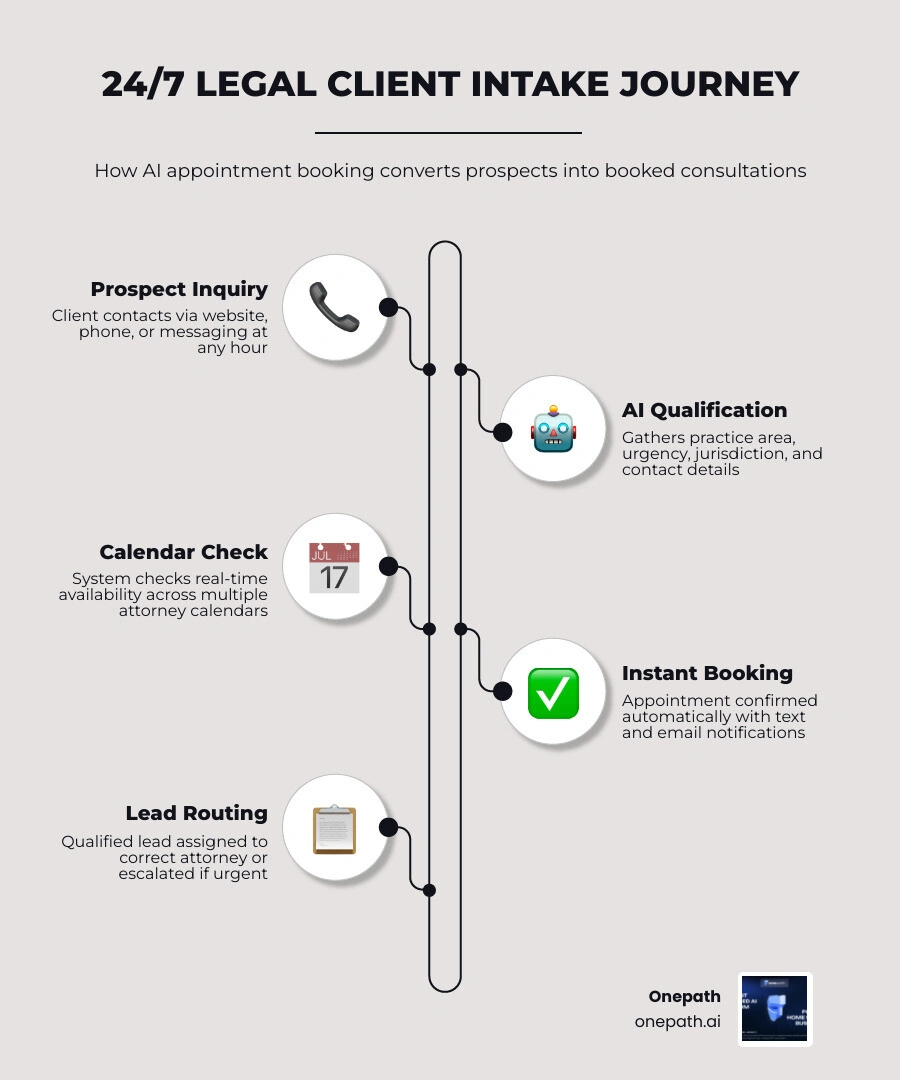
Here's how it works at a glance:
1. A prospect reaches out — via your website, phone, or messaging app, at any hour
2. The AI gathers key details — practice area, urgency, jurisdiction, and contact information
3. The system checks attorney availability — in real time, across multiple calendars
4. An appointment is booked instantly — with confirmations sent automatically by text and email
5. The lead is routed correctly — to the right attorney, or escalated to a human if the matter is urgent
If you run a law firm, you already know the problem: potential clients don't wait. Research shows the first firm to respond wins the client 78% of the time. Yet 57% of law firm communications happen outside traditional business hours — after your front desk has gone home.
Meanwhile, static contact forms convert just 2–4% of website visitors into actual inquiries. Phone tag eats up staff time. And a missed call at 9 PM on a Friday can mean a lost case by Monday morning.
The gap between when clients reach out and when firms respond is where revenue disappears. AI appointment booking closes that gap — automatically, at scale, without adding headcount.
Ai appointment booking for law firms word list:
• ai appointment booking for home services
• ai appointment booking for dental offices
• ai-powered appointment booking
The Rise of AI Appointment Booking for Law Firms
The legal industry has historically relied on traditional, manual scheduling methods. For decades, the standard procedure involved back-and-forth emails, voicemail tag, and endless administrative coordination. However, in June 2026, the landscape looks vastly different. Law firms are increasingly adopting conversational AI and automated scheduling systems to deliver immediate, 24/7 availability to prospective clients.
Traditional scheduling systems are passive. They require a user to navigate a calendar, select a slot, and manually fill out static fields. If the client has a question or feels uncertain about their legal needs, they often abandon the page and click on a competitor's site instead.
Conversational AI transforms this dynamic. Instead of a cold, empty calendar grid, the client is greeted by an intelligent assistant that engages them in a natural, real-time dialogue. This system acts as a virtual intake specialist, answering basic questions about the firm's practice areas, reassuring anxious callers, and guiding them smoothly toward a booked consultation. By providing instant responses, firms ensure that they capture peak interest when a prospect is most motivated to hire an attorney. For a comprehensive look at how these systems operate, check out our resource on AI Appointment Booking Assistance for Law Firms.
How Chatbots and Voice Agents Handle Legal Intake
Modern client intake is no longer confined to web forms. AI operates seamlessly across both text-based chatbots and voice-based phone agents to manage inquiries.
When a prospect visits a law firm’s website or calls their main office line, the AI agent initiates a structured yet highly conversational qualification process. It asks targeted questions to determine:
• The core legal issue (e.g., family law, personal injury, corporate litigation)
• The urgency of the matter (e.g., an upcoming court date or a recent accident)
• The relevant jurisdiction (ensuring the firm can legally represent them)
• Potential conflicts of interest (by gathering names of opposing parties)
This screening is crucial. Qualifying leads by phone manually can take 20 to 30 minutes per inquiry, which drains valuable paralegal or administrative resources. An AI voice agent can handle this entire conversation in under a minute, confirming availability and booking the consultation directly over the phone. To explore how voice-based technology is transforming the legal sector, read our AI Voice Agent for Law Firms Guide and learn more about the broader capabilities of a modern AI Voice Agent.
Seamless Calendar and Case Management Integrations
An AI scheduling tool is only as good as its ability to sync with the rest of your tech stack. If an AI agent operates in a silo, it risks double-booking attorneys or creating fragmented data silos that your staff must manually clean up.
Advanced AI appointment booking platforms integrate directly with your firm's existing calendars, CRMs, and case management systems. When a booking occurs, the system instantly updates all connected platforms in real time.
Here is a list of the key integration touchpoints that keep a modern law firm running smoothly:
• Real-Time Calendar Sync: Connects natively with Google Calendar, Microsoft Outlook, and Office 365 to read real-time availability and block out booked slots instantly.
• Legal CRM Integration: Automatically pushes contact information, case summaries, and conversation transcripts into legal CRMs like Salesforce, HubSpot, or Clio Grow.
• Practice Management Software: Updates platforms such as Clio, PracticePanther, MyCase, or Rocket Matter, setting up a new pending matter file before the attorney even hops on the initial call.
• Communication Triggers: Integrates with SMS and email gateways to deploy confirmation sequences, calendar invites, and reminder notifications automatically.
Key Features of Legal AI Scheduling Systems
Legal practices have unique operational demands that standard, off-the-shelf scheduling links cannot satisfy. Attorneys cannot simply open up their calendars to the public without strict controls.
First, a robust system must support multi-attorney routing. If a firm has five partners specializing in different areas, the AI must intelligently route family law inquiries to the family law partner and corporate disputes to the commercial litigator.
Second, the system must allow for custom availability and buffer times. An attorney billing at several hundred dollars an hour cannot afford back-to-back consultations without time to review case notes, draft follow-up emails, or travel to court hearings. AI systems allow firms to set hard limits, such as requiring a 15-minute buffer before and after every meeting, or capping the number of consultations an attorney will accept in a single day.
To see how conversational AI compares to traditional, passive methods, let's look at the differences:
• Response Time — Static Contact Forms: Hours to days (manual follow-up) — Conversational AI Booking: Instant, real-time engagement
• Availability — Static Contact Forms: 24/7 submission, but delayed reply — Conversational AI Booking: 24/7 interactive booking & qualification
• Lead Qualification — Static Contact Forms: Self-selected fields (often incomplete) — Conversational AI Booking: Dynamic, natural conversation flow
• Calendar Sync — Static Contact Forms: None (requires manual email tag) — Conversational AI Booking: Direct two-way sync with firm calendars
• Upfront Payments — Static Contact Forms: Requires separate invoicing steps — Conversational AI Booking: Integrated secure payment during booking
• Conversion Rate — Static Contact Forms: 2% – 4% average — Conversational AI Booking: 15% – 25% average
Custom Intake Questions and Conflict Checks
In the legal world, a conflict check is a mandatory first step before any meaningful discussion can take place. If an attorney accidentally consults with both parties in a divorce or a business dispute, they can compromise their ability to represent either client.
AI scheduling systems solve this by building conflict-check questions directly into the conversational intake flow. Before presenting open calendar slots, the AI asks for the names of all parties involved in the matter.
Once this information is captured, the system can route the booking as "pending" to an intake coordinator or run an automated database scan to flag potential conflicts. By standardizing this step, firms protect their billable time and ensure compliance with ethical guidelines before a single meeting is confirmed.
Key Security Standards in AI Appointment Booking for Law Firms
Law firms handle some of the most sensitive personal and corporate data imaginable. Because of this, security and compliance are non-negotiable.
Enterprise-grade AI booking systems employ rigorous security protocols to protect client confidentiality and comply with industry regulations. Key standards include:
• SOC 2 Type II Certification: Verifies that the platform has strict, independently audited controls in place to manage and protect customer data.
• End-to-End Encryption: Ensures that all data is encrypted both in transit (using TLS) and at rest (using AES-256 encryption).
• OAuth Authentication: Uses secure token-based authentication to connect to calendar and CRM systems, meaning the AI platform never stores your raw email or calendar passwords.
• ABA Compliance Guardrails: Configures the conversational flow to include necessary disclosures (such as ABA Rule 7.1) making it clear that initial intake conversations do not establish a formal attorney-client privilege.
Main Benefits of AI-Driven Legal Scheduling
Implementing an AI-driven scheduling system delivers immediate, compounding returns for both solo practitioners and multi-partner firms. The most obvious benefit is the massive boost in lead capture. When 30% to 40% of web inquiries arrive outside of normal business hours, having an active, intelligent agent ready to converse and book appointments ensures that you never lose a hot lead to a competitor simply because your office was closed.
Furthermore, this technology offers immense administrative relief. Instead of spending hours playing phone tag or manually entering contact details into a database, your staff can focus on high-value casework and client representation.

To learn more about how automation can optimize your business operations and free up billable hours, read our AI Appointment Booking Assistance Complete Guide.
Reducing No-Shows and Improving Conversion Rates
No-shows are incredibly costly for law firms. When an attorney blocks out an hour of their day for a consultation and the prospect fails to show up, it represents wasted billable time that can never be recovered.
AI appointment booking systems attack this problem in two ways: automated reminders and upfront fee collection.
1. Automated Reminders: The system automatically deploys personalized confirmation texts and emails immediately upon booking. It then sends follow-up reminders (typically 24 hours and 1 hour before the meeting). These texts include simple, low-friction links allowing the client to confirm or reschedule in a single tap.
2. Upfront Fee Collection: For firms that charge for initial consultations, the AI can seamlessly present the fee during the booking conversation and direct the user to a secure payment portal. By requiring payment or a retainer upfront, firms reduce their no-show rates by 30% to 50%, ensuring that only highly committed, qualified prospects secure time on an attorney's calendar.
For advice on how to handle missed connections and recapture lost opportunities, check out our Abandoned Calls Management Guide for Law Firms.
Balancing Automation with Human Handover Triggers
While AI is incredibly efficient at handling routine intake and scheduling, the legal field often involves highly sensitive, emotional, or complex situations that require a human touch. A client calling about an urgent criminal matter or a catastrophic accident needs to speak with a compassionate professional immediately.
A successful AI deployment relies on smart human handover triggers. The AI can be trained to recognize specific urgency keywords (such as "arrested," "jail," "injuries," or "statute of limitations") or complex legal scenarios.
When these triggers are met, the AI immediately alerts your team, transferring the live chat or phone call to an available intake coordinator or attorney. The system also clearly notifies the client when they are being handed over to a human representative, ensuring transparency and maintaining trust from the very first interaction.
Implementing AI Scheduling in Your Legal Practice
Adopting new technology can feel daunting, but modern AI scheduling systems are designed for rapid deployment. Many firms can get their basic systems up and running in just a couple of days with zero coding required.
The implementation process typically follows a simple, phased approach:
1. Define Your Rules: Outline your practice areas, consultation fee structures, attorney availability, and buffer requirements.
2. Configure the AI: Input your customized intake questions, conflict-check parameters, and brand voice guidelines into the platform.
3. Connect Your Stack: Sync the AI system with your calendar (Google/Outlook) and your legal CRM or practice management software.
4. Embed and Launch: Place a simple script tag on your website to launch the chat widget, or route your phone lines to your new voice agent.
If you run a boutique or solo practice and want a step-by-step roadmap for setting up automation, read our AI Appointment Booking Assistance Guide for Small Business.
Best Practices for Deploying AI Appointment Booking for Law Firms
To maximize the return on your investment, keep these best practices in mind as you launch and refine your AI scheduling system:
• Integrate with Your Marketing: Ensure your booking link or chat widget is prominently featured on your Google Business Profile, local SEO landing pages, and Google Ads campaigns. Law firms spend $200 to $500 per lead on competitive keywords; driving those paid clicks to an interactive AI agent instead of a passive form ensures you get the highest possible conversion rate from your ad spend.
• Keep Event Titles Neutral: To protect client confidentiality and keep your calendar clean, configure your system to use generic event titles (e.g., "Initial Consultation" or "Client Meeting") rather than descriptive matter names that could leak sensitive information.
• Monitor and Optimize: Regularly review chat transcripts and call recordings. Identify where prospects drop off or ask questions the AI cannot answer, and update your system prompts iteratively to continuously improve the user experience.
Frequently Asked Questions about Legal AI Scheduling
Can the AI handle multiple lawyer calendars?
Yes. Advanced AI scheduling systems are built to manage complex, multi-attorney practices. The system can segment availability by practice area, office location, or language preference, routing the prospect to the appropriate lawyer's calendar automatically while avoiding double-bookings.
How does the system handle urgent or complex inquiries?
The AI uses advanced natural language processing (NLP) to detect urgency and complexity. If a user mentions a time-sensitive issue or uses specific high-priority keywords, the system bypasses the automated scheduling loop and triggers an immediate human handover, alerting your staff via SMS, email, or a CRM notification.
Is client data secure and compliant with legal regulations?
Yes, provided you choose an enterprise-grade solution. Top-tier platforms utilize SOC 2 Type II certified infrastructure, 256-bit encryption for data at rest and in transit, and secure OAuth connections for calendar sync. They also incorporate clear disclosures to ensure compliance with ABA guidelines regarding attorney-client privilege.
Conclusion
In the highly competitive legal landscape of 2026, responsiveness is the ultimate differentiator. When a legal emergency strikes, clients do not want to wait for a callback or fill out a passive contact form. They want answers, reassurance, and a clear path forward — immediately.
By adopting ai appointment booking for law firms, your practice can operate 24/7, capturing hot leads, qualifying cases, and booking high-value consultations on autopilot. This is where we can help. At Onepath, we provide an AI Lead Manager and an all-in-one CRM designed to streamline your client intake journey. With our rapid 72-hour setup, full customer journey visibility, and 24/7 human support, we ensure that your firm never misses another lead.
Ready to eliminate administrative bottlenecks and scale your practice? Get started with Onepath's AI solutions today.

Why Law Firms Can't Afford to Ignore AI Appointment Booking
AI appointment booking for law firms is the process of using conversational AI — chatbots, voice agents, or both — to automatically handle client intake, qualify leads, and schedule consultations around the clock, without a human receptionist.
Here's how it works at a glance:
- A prospect reaches out — via your website, phone, or messaging app, at any hour
- The AI gathers key details — practice area, urgency, jurisdiction, and contact information
- The system checks attorney availability — in real time, across multiple calendars
- An appointment is booked instantly — with confirmations sent automatically by text and email
- The lead is routed correctly — to the right attorney, or escalated to a human if the matter is urgent
If you run a law firm, you already know the problem: potential clients don't wait. Research shows the first firm to respond wins the client 78% of the time. Yet 57% of law firm communications happen outside traditional business hours — after your front desk has gone home.
Meanwhile, static contact forms convert just 2–4% of website visitors into actual inquiries. Phone tag eats up staff time. And a missed call at 9 PM on a Friday can mean a lost case by Monday morning.
The gap between when clients reach out and when firms respond is where revenue disappears. AI appointment booking closes that gap — automatically, at scale, without adding headcount.
Ai appointment booking for law firms word list:
- ai appointment booking for home services
- ai appointment booking for dental offices
- ai-powered appointment booking
The Rise of AI Appointment Booking for Law Firms
The legal industry has historically relied on traditional, manual scheduling methods. For decades, the standard procedure involved back-and-forth emails, voicemail tag, and endless administrative coordination. However, in June 2026, the landscape looks vastly different. Law firms are increasingly adopting conversational AI and automated scheduling systems to deliver immediate, 24/7 availability to prospective clients.
Traditional scheduling systems are passive. They require a user to navigate a calendar, select a slot, and manually fill out static fields. If the client has a question or feels uncertain about their legal needs, they often abandon the page and click on a competitor's site instead.
Conversational AI transforms this dynamic. Instead of a cold, empty calendar grid, the client is greeted by an intelligent assistant that engages them in a natural, real-time dialogue. This system acts as a virtual intake specialist, answering basic questions about the firm's practice areas, reassuring anxious callers, and guiding them smoothly toward a booked consultation. By providing instant responses, firms ensure that they capture peak interest when a prospect is most motivated to hire an attorney. For a comprehensive look at how these systems operate, check out our resource on AI Appointment Booking Assistance for Law Firms.
How Chatbots and Voice Agents Handle Legal Intake
Modern client intake is no longer confined to web forms. AI operates seamlessly across both text-based chatbots and voice-based phone agents to manage inquiries.
When a prospect visits a law firm’s website or calls their main office line, the AI agent initiates a structured yet highly conversational qualification process. It asks targeted questions to determine:
- The core legal issue (e.g., family law, personal injury, corporate litigation)
- The urgency of the matter (e.g., an upcoming court date or a recent accident)
- The relevant jurisdiction (ensuring the firm can legally represent them)
- Potential conflicts of interest (by gathering names of opposing parties)
This screening is crucial. Qualifying leads by phone manually can take 20 to 30 minutes per inquiry, which drains valuable paralegal or administrative resources. An AI voice agent can handle this entire conversation in under a minute, confirming availability and booking the consultation directly over the phone. To explore how voice-based technology is transforming the legal sector, read our AI Voice Agent for Law Firms Guide and learn more about the broader capabilities of a modern AI Voice Agent.
Seamless Calendar and Case Management Integrations
An AI scheduling tool is only as good as its ability to sync with the rest of your tech stack. If an AI agent operates in a silo, it risks double-booking attorneys or creating fragmented data silos that your staff must manually clean up.
Advanced AI appointment booking platforms integrate directly with your firm's existing calendars, CRMs, and case management systems. When a booking occurs, the system instantly updates all connected platforms in real time.
Here is a list of the key integration touchpoints that keep a modern law firm running smoothly:
- Real-Time Calendar Sync: Connects natively with Google Calendar, Microsoft Outlook, and Office 365 to read real-time availability and block out booked slots instantly.
- Legal CRM Integration: Automatically pushes contact information, case summaries, and conversation transcripts into legal CRMs like Salesforce, HubSpot, or Clio Grow.
- Practice Management Software: Updates platforms such as Clio, PracticePanther, MyCase, or Rocket Matter, setting up a new pending matter file before the attorney even hops on the initial call.
- Communication Triggers: Integrates with SMS and email gateways to deploy confirmation sequences, calendar invites, and reminder notifications automatically.
Key Features of Legal AI Scheduling Systems
Legal practices have unique operational demands that standard, off-the-shelf scheduling links cannot satisfy. Attorneys cannot simply open up their calendars to the public without strict controls.
First, a robust system must support multi-attorney routing. If a firm has five partners specializing in different areas, the AI must intelligently route family law inquiries to the family law partner and corporate disputes to the commercial litigator.
Second, the system must allow for custom availability and buffer times. An attorney billing at several hundred dollars an hour cannot afford back-to-back consultations without time to review case notes, draft follow-up emails, or travel to court hearings. AI systems allow firms to set hard limits, such as requiring a 15-minute buffer before and after every meeting, or capping the number of consultations an attorney will accept in a single day.
To see how conversational AI compares to traditional, passive methods, let's look at the differences:
| Feature | Static Contact Forms | Conversational AI Booking |
|---|---|---|
| Response Time | Hours to days (manual follow-up) | Instant, real-time engagement |
| Availability | 24/7 submission, but delayed reply | 24/7 interactive booking & qualification |
| Lead Qualification | Self-selected fields (often incomplete) | Dynamic, natural conversation flow |
| Calendar Sync | None (requires manual email tag) | Direct two-way sync with firm calendars |
| Upfront Payments | Requires separate invoicing steps | Integrated secure payment during booking |
| Conversion Rate | 2% – 4% average | 15% – 25% average |
Custom Intake Questions and Conflict Checks
In the legal world, a conflict check is a mandatory first step before any meaningful discussion can take place. If an attorney accidentally consults with both parties in a divorce or a business dispute, they can compromise their ability to represent either client.
AI scheduling systems solve this by building conflict-check questions directly into the conversational intake flow. Before presenting open calendar slots, the AI asks for the names of all parties involved in the matter.
Once this information is captured, the system can route the booking as "pending" to an intake coordinator or run an automated database scan to flag potential conflicts. By standardizing this step, firms protect their billable time and ensure compliance with ethical guidelines before a single meeting is confirmed.
Key Security Standards in AI Appointment Booking for Law Firms
Law firms handle some of the most sensitive personal and corporate data imaginable. Because of this, security and compliance are non-negotiable.
Enterprise-grade AI booking systems employ rigorous security protocols to protect client confidentiality and comply with industry regulations. Key standards include:
- SOC 2 Type II Certification: Verifies that the platform has strict, independently audited controls in place to manage and protect customer data.
- End-to-End Encryption: Ensures that all data is encrypted both in transit (using TLS) and at rest (using AES-256 encryption).
- OAuth Authentication: Uses secure token-based authentication to connect to calendar and CRM systems, meaning the AI platform never stores your raw email or calendar passwords.
- ABA Compliance Guardrails: Configures the conversational flow to include necessary disclosures (such as ABA Rule 7.1) making it clear that initial intake conversations do not establish a formal attorney-client privilege.
Main Benefits of AI-Driven Legal Scheduling
Implementing an AI-driven scheduling system delivers immediate, compounding returns for both solo practitioners and multi-partner firms. The most obvious benefit is the massive boost in lead capture. When 30% to 40% of web inquiries arrive outside of normal business hours, having an active, intelligent agent ready to converse and book appointments ensures that you never lose a hot lead to a competitor simply because your office was closed.
Furthermore, this technology offers immense administrative relief. Instead of spending hours playing phone tag or manually entering contact details into a database, your staff can focus on high-value casework and client representation.
To learn more about how automation can optimize your business operations and free up billable hours, read our AI Appointment Booking Assistance Complete Guide.
Reducing No-Shows and Improving Conversion Rates
No-shows are incredibly costly for law firms. When an attorney blocks out an hour of their day for a consultation and the prospect fails to show up, it represents wasted billable time that can never be recovered.
AI appointment booking systems attack this problem in two ways: automated reminders and upfront fee collection.
- Automated Reminders: The system automatically deploys personalized confirmation texts and emails immediately upon booking. It then sends follow-up reminders (typically 24 hours and 1 hour before the meeting). These texts include simple, low-friction links allowing the client to confirm or reschedule in a single tap.
- Upfront Fee Collection: For firms that charge for initial consultations, the AI can seamlessly present the fee during the booking conversation and direct the user to a secure payment portal. By requiring payment or a retainer upfront, firms reduce their no-show rates by 30% to 50%, ensuring that only highly committed, qualified prospects secure time on an attorney's calendar.
For advice on how to handle missed connections and recapture lost opportunities, check out our Abandoned Calls Management Guide for Law Firms.
Balancing Automation with Human Handover Triggers
While AI is incredibly efficient at handling routine intake and scheduling, the legal field often involves highly sensitive, emotional, or complex situations that require a human touch. A client calling about an urgent criminal matter or a catastrophic accident needs to speak with a compassionate professional immediately.
A successful AI deployment relies on smart human handover triggers. The AI can be trained to recognize specific urgency keywords (such as "arrested," "jail," "injuries," or "statute of limitations") or complex legal scenarios.
When these triggers are met, the AI immediately alerts your team, transferring the live chat or phone call to an available intake coordinator or attorney. The system also clearly notifies the client when they are being handed over to a human representative, ensuring transparency and maintaining trust from the very first interaction.
Implementing AI Scheduling in Your Legal Practice
Adopting new technology can feel daunting, but modern AI scheduling systems are designed for rapid deployment. Many firms can get their basic systems up and running in just a couple of days with zero coding required.
The implementation process typically follows a simple, phased approach:
- Define Your Rules: Outline your practice areas, consultation fee structures, attorney availability, and buffer requirements.
- Configure the AI: Input your customized intake questions, conflict-check parameters, and brand voice guidelines into the platform.
- Connect Your Stack: Sync the AI system with your calendar (Google/Outlook) and your legal CRM or practice management software.
- Embed and Launch: Place a simple script tag on your website to launch the chat widget, or route your phone lines to your new voice agent.
If you run a boutique or solo practice and want a step-by-step roadmap for setting up automation, read our AI Appointment Booking Assistance Guide for Small Business.
Best Practices for Deploying AI Appointment Booking for Law Firms
To maximize the return on your investment, keep these best practices in mind as you launch and refine your AI scheduling system:
- Integrate with Your Marketing: Ensure your booking link or chat widget is prominently featured on your Google Business Profile, local SEO landing pages, and Google Ads campaigns. Law firms spend $200 to $500 per lead on competitive keywords; driving those paid clicks to an interactive AI agent instead of a passive form ensures you get the highest possible conversion rate from your ad spend.
- Keep Event Titles Neutral: To protect client confidentiality and keep your calendar clean, configure your system to use generic event titles (e.g., "Initial Consultation" or "Client Meeting") rather than descriptive matter names that could leak sensitive information.
- Monitor and Optimize: Regularly review chat transcripts and call recordings. Identify where prospects drop off or ask questions the AI cannot answer, and update your system prompts iteratively to continuously improve the user experience.
Frequently Asked Questions about Legal AI Scheduling
Can the AI handle multiple lawyer calendars?
Yes. Advanced AI scheduling systems are built to manage complex, multi-attorney practices. The system can segment availability by practice area, office location, or language preference, routing the prospect to the appropriate lawyer's calendar automatically while avoiding double-bookings.
How does the system handle urgent or complex inquiries?
The AI uses advanced natural language processing (NLP) to detect urgency and complexity. If a user mentions a time-sensitive issue or uses specific high-priority keywords, the system bypasses the automated scheduling loop and triggers an immediate human handover, alerting your staff via SMS, email, or a CRM notification.
Is client data secure and compliant with legal regulations?
Yes, provided you choose an enterprise-grade solution. Top-tier platforms utilize SOC 2 Type II certified infrastructure, 256-bit encryption for data at rest and in transit, and secure OAuth connections for calendar sync. They also incorporate clear disclosures to ensure compliance with ABA guidelines regarding attorney-client privilege.
Conclusion
In the highly competitive legal landscape of 2026, responsiveness is the ultimate differentiator. When a legal emergency strikes, clients do not want to wait for a callback or fill out a passive contact form. They want answers, reassurance, and a clear path forward — immediately.
By adopting ai appointment booking for law firms, your practice can operate 24/7, capturing hot leads, qualifying cases, and booking high-value consultations on autopilot. This is where we can help. At Onepath, we provide an AI Lead Manager and an all-in-one CRM designed to streamline your client intake journey. With our rapid 72-hour setup, full customer journey visibility, and 24/7 human support, we ensure that your firm never misses another lead.
Ready to eliminate administrative bottlenecks and scale your practice? Get started with Onepath's AI solutions today.
Boost Your Lead Conversions. Start Using Onepath Today.
Onepath is your AI Lead Manager, built by tech experts and home service pros. It responds instantly, schedules appointments, personalizes customer interactions, and ensures no lead slips through the cracks—backed by 24/7 human support.
[ Schedule Discovery call ].webp)