.svg)

How to Master Integration Workflow Optimizations in 2026
.webp)
Why Integration Workflow Optimizations Are Critical for Growing Home Service Businesses

Integration workflow optimizations are the systematic process of analyzing, refining, and automating how your business systems communicate and share data—from lead capture to scheduling to customer follow-up. For home service business owners, disconnected tools mean lost leads, double-entry work, and frustrated customers who can't get instant responses. When your CRM, scheduling software, and communication channels don't talk to each other, you're burning hours manually copying information and missing revenue opportunities every single day.
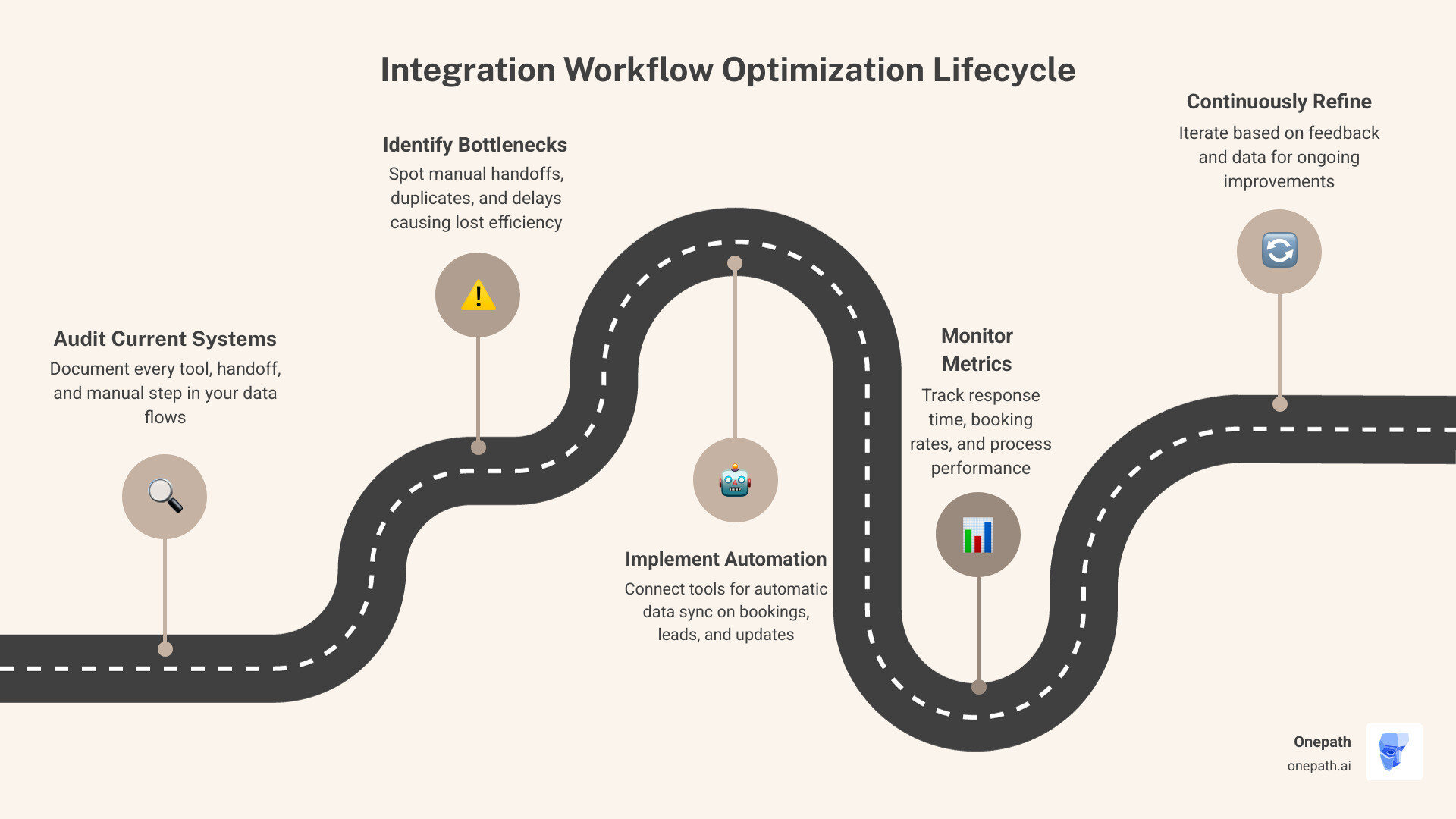
Quick Answer: Key Steps to Optimize Integration Workflows
1. Map your current data flow – Document every tool, handoff point, and manual step
2. Identify bottlenecks – Find where information gets stuck, duplicated, or lost
3. Automate repetitive tasks – Connect systems to sync data automatically (bookings, lead info, status updates)
4. Monitor and iterate – Track metrics like response time and booking conversion, then refine
If you're managing your home service business operations, mastering these optimizations can transform scattered processes into a seamless system that captures and converts leads automatically.
Research shows that organizations implementing automation technologies see productivity improvements of 20–25%, while structured workflows reduce time wasted on administrative tasks by nearly 30%. For a busy home service operation juggling phone calls, text messages, online inquiries, and service appointments, these efficiency gains translate directly to more completed jobs and happier customers. The challenge isn't whether to optimize your integration workflows—it's knowing where to start and how to implement changes without disrupting daily operations.
Understanding Integration Workflow Optimizations for Modern Business
In the world of home services, integration workflow optimizations are no longer a "nice-to-have" luxury; they are a business imperative. Industry research on digital strategy shows that companies that streamline their processes consistently achieve superior results by delivering services faster and responding to market changes more effectively.
But what exactly do we mean by "optimization"? It isn't just about setting up a tool once and forgetting it. It is the systematic refinement of how your various software platforms—like your lead capture forms, CRM, and dispatching software—work together.
The benefits are immediate and measurable:
• Reduced Manual Work: Studies on administrative time reveal that companies implementing structured workflows reduced time wasted on administrative tasks by nearly 30%. For us in the home service industry, that means less time typing customer addresses into three different systems and more time getting technicians to job sites.
• Increased Transparency: When systems are integrated, everyone from the office manager to the field technician sees the same data in real-time.
• Faster Decision-Making: With optimized data flows, you don't have to wait for a weekly report to know your lead-to-booking ratio. The data is there, ready for you to act on.
5 Steps to Map and Audit Your Integration Processes
Before we can fix what’s broken, we have to see the whole picture. Many business owners think they know how their office runs, but there are often "hidden" workflows—the sticky notes on desks or the manual texts sent to technicians—that aren't documented.
1. Visual Documentation
Start by creating a visual map of your current lead-to-completion journey. Document every tool used (website forms, phone systems) and where that data goes. Use a structured process design approach to ensure you aren't just looking at the software, but the human steps in between.
2. Stakeholder Engagement
Talk to your team. Your dispatchers and technicians are the ones living in these workflows every day. Ask them: "Where do you have to type the same thing twice?" or "Where does the communication usually break down?"
3. Identifying Blockers
Look for where the "red tape" lives. Are you requiring a manual approval for every single quote, even for standard services? These are the friction points where integration workflow optimizations can make the biggest impact.
4. Defining KPIs
You cannot manage what you do not measure. Use a framework for defining KPIs to set a baseline. Common metrics include:
• Time-to-response: How long does it take for a lead to get a reply?
• Error rate: How often is a customer’s phone number or address recorded incorrectly?
• Cycle time: How long from the first call to the final invoice?
5. Data-Driven Goals
Set specific targets. For example, "Reduce manual data entry time by 50% within three months."
Identifying Bottlenecks in Integration Workflow Optimizations
Bottlenecks are the "clogs" in your business pipes. In the home service world, these often look like:
• Information Silos: Your sales team has the lead's notes, but the technician arrives with no idea what the customer actually needs.
• Lack of Visibility: Not knowing which marketing channel actually resulted in the most booked jobs.
• Manual Data Entry: Spending 8-12 hours a week manually copying lead info into your CRM.
• Communication Friction: Using multiple different apps to talk to one customer.
By streamlining business processes, we remove these redundant steps and ensure the "water" flows smoothly from lead to revenue.
Best Practices for Streamlining Integrated Workflows
Efficiency is a delicate balance. You want your systems to be fast, but they also need to be reliable. Interestingly, top-performing managers have a formal process for improving their existing practices. They don't just "wing it."
One of the most effective ways to optimize is by managing task consumption. In cloud integrations, every "step" or "task" requires time. By condensing multiple checks into a single step, you make your system more robust.
• Standard Workflow — Best For: Long-running tasks (e.g., waiting for a customer to sign a contract) — Key Benefit: High durability and audit history
• Express Workflow — Best For: High-volume, short tasks (e.g., sending a quick automated text) — Key Benefit: Greater efficiency and higher speed
Standardization is your best friend. Creating a "single source of truth" prevents the chaos of having different versions of customer data floating around.
Automating Repetitive Tasks with Integration Workflow Optimizations
Automation isn't about replacing your team; it’s about giving them their time back.
• Smart Templates: Instead of drafting every email from scratch, use AI-powered templates that pull in the customer's name, service type, and appointment time automatically.
• Webhook Triggers: When someone leaves a lead on your website, a webhook should instantly push that data into your CRM and trigger an Automated Scheduling response.
• Linking Internal Apps: Use integrations to link your communication channels and your CRM so that your team gets a notification the second a "hot" lead comes in.
• Status Updates: Automatically text a customer when a technician is 15 minutes away. This reduces "where are you?" phone calls by up to 80%.
For those using industry-standard tools, an integrated AI solution can bridge the gap between your marketing leads and your dispatch board without manual intervention.
Leveraging AI and Cloud Strategies for High-Performance Integrations
AI has moved from science fiction to a practical tool for the modern contractor. In 2026, integration workflow optimizations are heavily driven by "agentic" AI—systems that can think and act on your behalf.
• Smart Ticket Routing: AI can analyze an incoming service request and route it to the technician with the highest "success rate" for that specific type of job (e.g., sending your best repair person to a job).
• Predictive Lead Scoring: Advanced lead scoring tools remove the guesswork. AI analyzes hundreds of data points to tell you which leads are most likely to book, allowing your office staff to focus on the "sure things" first.
• Self-Service Solutions: AI chatbots can now handle initial troubleshooting or simple booking requests 24/7. Research on AI speed suggests that AI can qualify leads in under 5 minutes, ensuring you never miss out on a lead simply because of a slow response.
Advanced Cloud Integration Workflow Optimizations
For larger businesses or those with complex tech stacks, cloud-native strategies are essential for performance.
• Timeouts and Heartbeats: Use best practices for cloud functions to ensure that if one part of your integration fails, the whole system doesn't get "stuck."
• Chaining Procedures: When dealing with high volumes of data, use settings for long-running integration procedures to break the work into "chunks." This prevents your system from hitting system limits or crashing during busy seasons.
• Efficient Architecture: By building efficient workflows, you can nest smaller, faster workflows inside larger ones to save on processing power while maintaining full visibility of the customer journey.
Frequently Asked Questions about Integration Workflow Optimizations
What are the main benefits of workflow automation?
The primary benefits include massive productivity gains (20-25%), a 30% reduction in administrative waste, and significantly higher customer satisfaction. Automated systems don't forget to follow up, and they don't make typos. As industry insights suggest, it turns your operations into a significant operational advantage.
How do I choose the right tools for optimization?
Focus on five key areas:
1. Scalability: Can the tool grow from 5 technicians to 50?
2. Security: Is your customer data protected?
3. Native Integrations: Does it play well with tools you already use?
4. Automation Features: Does it allow for "if-this-then-that" logic without needing a computer science degree?
5. Visibility: Does it provide a clear dashboard of your performance?
How does AI improve lead qualification workflows?
AI uses predictive scoring to rank leads based on their likelihood to convert. It can also perform "automated enrichment," which means it automatically finds the customer's service history, property details, and even public records before your staff even picks up the phone. This allows for real-time routing of high-value leads to your top sales reps.
Conclusion
Mastering integration workflow optimizations is a journey, not a destination. The business landscape in 2026 moves fast, and your systems must be able to adapt. By mapping your processes, identifying bottlenecks, and leveraging AI, you move from a reactive "firefighting" mode to a proactive, growth-oriented operation.
At Onepath, we specialize in making this transition seamless for home service businesses. Our AI Lead Manager and all-in-one CRM provide a multi-channel lead capture AI that ensures no lead is ever left behind. Whether you need an automated scheduling AI setup or a full overhaul of your customer journey visibility, we can get you running in as little as 72 hours.
Don't let manual processes cap your growth. Start optimizing today, and let your technology do the heavy lifting so you can focus on what you do best: providing excellent service to your community.

Why Integration Workflow Optimizations Are Critical for Growing Home Service Businesses
Integration workflow optimizations are the systematic process of analyzing, refining, and automating how your business systems communicate and share data—from lead capture to scheduling to customer follow-up. For home service business owners, disconnected tools mean lost leads, double-entry work, and frustrated customers who can't get instant responses. When your CRM, scheduling software, and communication channels don't talk to each other, you're burning hours manually copying information and missing revenue opportunities every single day.
Quick Answer: Key Steps to Optimize Integration Workflows
- Map your current data flow – Document every tool, handoff point, and manual step
- Identify bottlenecks – Find where information gets stuck, duplicated, or lost
- Automate repetitive tasks – Connect systems to sync data automatically (bookings, lead info, status updates)
- Monitor and iterate – Track metrics like response time and booking conversion, then refine
If you're managing your home service business operations, mastering these optimizations can transform scattered processes into a seamless system that captures and converts leads automatically.
Research shows that organizations implementing automation technologies see productivity improvements of 20–25%, while structured workflows reduce time wasted on administrative tasks by nearly 30%. For a busy home service operation juggling phone calls, text messages, online inquiries, and service appointments, these efficiency gains translate directly to more completed jobs and happier customers. The challenge isn't whether to optimize your integration workflows—it's knowing where to start and how to implement changes without disrupting daily operations.
Understanding Integration Workflow Optimizations for Modern Business
In the world of home services, integration workflow optimizations are no longer a "nice-to-have" luxury; they are a business imperative. Industry research on digital strategy shows that companies that streamline their processes consistently achieve superior results by delivering services faster and responding to market changes more effectively.
But what exactly do we mean by "optimization"? It isn't just about setting up a tool once and forgetting it. It is the systematic refinement of how your various software platforms—like your lead capture forms, CRM, and dispatching software—work together.
The benefits are immediate and measurable:
- Reduced Manual Work: Studies on administrative time reveal that companies implementing structured workflows reduced time wasted on administrative tasks by nearly 30%. For us in the home service industry, that means less time typing customer addresses into three different systems and more time getting technicians to job sites.
- Increased Transparency: When systems are integrated, everyone from the office manager to the field technician sees the same data in real-time.
- Faster Decision-Making: With optimized data flows, you don't have to wait for a weekly report to know your lead-to-booking ratio. The data is there, ready for you to act on.
5 Steps to Map and Audit Your Integration Processes
Before we can fix what’s broken, we have to see the whole picture. Many business owners think they know how their office runs, but there are often "hidden" workflows—the sticky notes on desks or the manual texts sent to technicians—that aren't documented.
1. Visual Documentation
Start by creating a visual map of your current lead-to-completion journey. Document every tool used (website forms, phone systems) and where that data goes. Use a structured process design approach to ensure you aren't just looking at the software, but the human steps in between.
2. Stakeholder Engagement
Talk to your team. Your dispatchers and technicians are the ones living in these workflows every day. Ask them: "Where do you have to type the same thing twice?" or "Where does the communication usually break down?"
3. Identifying Blockers
Look for where the "red tape" lives. Are you requiring a manual approval for every single quote, even for standard services? These are the friction points where integration workflow optimizations can make the biggest impact.
4. Defining KPIs
You cannot manage what you do not measure. Use a framework for defining KPIs to set a baseline. Common metrics include:
- Time-to-response: How long does it take for a lead to get a reply?
- Error rate: How often is a customer’s phone number or address recorded incorrectly?
- Cycle time: How long from the first call to the final invoice?
5. Data-Driven Goals
Set specific targets. For example, "Reduce manual data entry time by 50% within three months."
Identifying Bottlenecks in Integration Workflow Optimizations
Bottlenecks are the "clogs" in your business pipes. In the home service world, these often look like:
- Information Silos: Your sales team has the lead's notes, but the technician arrives with no idea what the customer actually needs.
- Lack of Visibility: Not knowing which marketing channel actually resulted in the most booked jobs.
- Manual Data Entry: Spending 8-12 hours a week manually copying lead info into your CRM.
- Communication Friction: Using multiple different apps to talk to one customer.
By streamlining business processes, we remove these redundant steps and ensure the "water" flows smoothly from lead to revenue.
Best Practices for Streamlining Integrated Workflows
Efficiency is a delicate balance. You want your systems to be fast, but they also need to be reliable. Interestingly, top-performing managers have a formal process for improving their existing practices. They don't just "wing it."
One of the most effective ways to optimize is by managing task consumption. In cloud integrations, every "step" or "task" requires time. By condensing multiple checks into a single step, you make your system more robust.
| Workflow Pattern | Best For | Key Benefit |
|---|---|---|
| Standard Workflow | Long-running tasks (e.g., waiting for a customer to sign a contract) | High durability and audit history |
| Express Workflow | High-volume, short tasks (e.g., sending a quick automated text) | Greater efficiency and higher speed |
Standardization is your best friend. Creating a "single source of truth" prevents the chaos of having different versions of customer data floating around.
Automating Repetitive Tasks with Integration Workflow Optimizations
Automation isn't about replacing your team; it’s about giving them their time back.
- Smart Templates: Instead of drafting every email from scratch, use AI-powered templates that pull in the customer's name, service type, and appointment time automatically.
- Webhook Triggers: When someone leaves a lead on your website, a webhook should instantly push that data into your CRM and trigger an Automated Scheduling response.
- Linking Internal Apps: Use integrations to link your communication channels and your CRM so that your team gets a notification the second a "hot" lead comes in.
- Status Updates: Automatically text a customer when a technician is 15 minutes away. This reduces "where are you?" phone calls by up to 80%.
For those using industry-standard tools, an integrated AI solution can bridge the gap between your marketing leads and your dispatch board without manual intervention.
Leveraging AI and Cloud Strategies for High-Performance Integrations
AI has moved from science fiction to a practical tool for the modern contractor. In 2026, integration workflow optimizations are heavily driven by "agentic" AI—systems that can think and act on your behalf.
- Smart Ticket Routing: AI can analyze an incoming service request and route it to the technician with the highest "success rate" for that specific type of job (e.g., sending your best repair person to a job).
- Predictive Lead Scoring: Advanced lead scoring tools remove the guesswork. AI analyzes hundreds of data points to tell you which leads are most likely to book, allowing your office staff to focus on the "sure things" first.
- Self-Service Solutions: AI chatbots can now handle initial troubleshooting or simple booking requests 24/7. Research on AI speed suggests that AI can qualify leads in under 5 minutes, ensuring you never miss out on a lead simply because of a slow response.
Advanced Cloud Integration Workflow Optimizations
For larger businesses or those with complex tech stacks, cloud-native strategies are essential for performance.
- Timeouts and Heartbeats: Use best practices for cloud functions to ensure that if one part of your integration fails, the whole system doesn't get "stuck."
- Chaining Procedures: When dealing with high volumes of data, use settings for long-running integration procedures to break the work into "chunks." This prevents your system from hitting system limits or crashing during busy seasons.
- Efficient Architecture: By building efficient workflows, you can nest smaller, faster workflows inside larger ones to save on processing power while maintaining full visibility of the customer journey.
Frequently Asked Questions about Integration Workflow Optimizations
What are the main benefits of workflow automation?
The primary benefits include massive productivity gains (20-25%), a 30% reduction in administrative waste, and significantly higher customer satisfaction. Automated systems don't forget to follow up, and they don't make typos. As industry insights suggest, it turns your operations into a significant operational advantage.
How do I choose the right tools for optimization?
Focus on five key areas:
- Scalability: Can the tool grow from 5 technicians to 50?
- Security: Is your customer data protected?
- Native Integrations: Does it play well with tools you already use?
- Automation Features: Does it allow for "if-this-then-that" logic without needing a computer science degree?
- Visibility: Does it provide a clear dashboard of your performance?
How does AI improve lead qualification workflows?
AI uses predictive scoring to rank leads based on their likelihood to convert. It can also perform "automated enrichment," which means it automatically finds the customer's service history, property details, and even public records before your staff even picks up the phone. This allows for real-time routing of high-value leads to your top sales reps.
Conclusion
Mastering integration workflow optimizations is a journey, not a destination. The business landscape in 2026 moves fast, and your systems must be able to adapt. By mapping your processes, identifying bottlenecks, and leveraging AI, you move from a reactive "firefighting" mode to a proactive, growth-oriented operation.
At Onepath, we specialize in making this transition seamless for home service businesses. Our AI Lead Manager and all-in-one CRM provide a multi-channel lead capture AI that ensures no lead is ever left behind. Whether you need an automated scheduling AI setup or a full overhaul of your customer journey visibility, we can get you running in as little as 72 hours.
Don't let manual processes cap your growth. Start optimizing today, and let your technology do the heavy lifting so you can focus on what you do best: providing excellent service to your community.
Boost Your Lead Conversions. Start Using Onepath Today.
Onepath is your AI Lead Manager, built by tech experts and home service pros. It responds instantly, schedules appointments, personalizes customer interactions, and ensures no lead slips through the cracks—backed by 24/7 human support.
[ Schedule Discovery call ].webp)